Most of us who look after MySQL have been asked some version of this question: which of our servers are behind on patches? It sounds like a question with a quick answer. It stops being quick the moment the fleet is spread out. Some servers are in the data center, some are virtual machines in a cloud, some are a managed service that someone else patches, and each group is watched by a different tool.
We hear this often from customers whose MySQL footprint straddles on-premises and cloud. Very few of them run MySQL one way. A typical estate has servers in the data center, self-managed MySQL on virtual machines in one or two clouds, and managed instances on services such as Amazon RDS, OCI HeatWave, or Google Cloud SQL. Some are moving from one to another. Many simply intend to keep the mix. Either way, monitoring ends up split across more than one tool, and keeping up with MySQL patch releases, already hard, gets harder when no single view covers the whole fleet.
Here is the short version. Update 1 of the MySQL Plug-in for Oracle Enterprise Manager ships on December 1, 2026, and it brings two dashboards built for this situation. MySQL Patch Currency shows every monitored MySQL database as current, behind, or end of life, wherever it runs. MySQL Fleet shows inventory, availability, incidents, and compliance for the same databases. Separately, we recently added Google Cloud to our certified cloud platforms. Google Cloud SQL for MySQL 8.4 is certified on the release you can install today, alongside Amazon RDS and Aurora on AWS and MySQL HeatWave on OCI, and Azure Database for MySQL is supported. We have run the plug-in against self-managed MySQL on Compute Engine as well. The data center servers, the cloud virtual machines, and the managed instances sit on one page, in the console your Oracle DBAs already use.
This post has three parts:
- Why a mixed MySQL fleet is hard to keep patched
- The MySQL Patch Currency and MySQL Fleet dashboards, section by section
- What we found monitoring MySQL on Google Cloud, including what Cloud SQL does differently
We are walking through all of this live on Wednesday, December 2, 2026 at 1:00 PM ET. Register for the webinar and the recording and slides come to you either way.
Why a mixed MySQL fleet is hard to keep patched
A mixed fleet is rarely a plan. It is what years of reasonable decisions add up to. One application stayed in the data center because of latency. Another was lifted onto cloud virtual machines. A newer one was built on a managed service from the start, and an acquisition brought a second cloud with it. Each choice made sense, and together they leave three problems for anyone trying to answer the patch question.
The inventory lives in several places. The data center servers are in one monitoring tool. The cloud servers are often in another, chosen by a different team at a different time. Each managed service has its own console again, one per cloud. To answer "what versions are we running?" somebody exports three lists and merges them by hand, and the merged list is out of date by the following week.
"Behind" means different things on different platforms. On a self-managed server, being two patches behind is a job for your team. On a managed service, the provider sets the patch level and the schedule, so the same two patches are something to know about and plan around, not something to fix tonight. A flat list of version numbers hides that difference.
Version numbers alone do not say what matters. A server on 9.5.0 looks newer than one on 8.4.13. It is in fact worse off, because 9.5 was an innovation release that has been superseded and will never get another patch, while 8.4.13 is the current patch of a supported series. An InnoDB Cluster with one member upgraded and two not upgraded is in a state nobody intended to leave it in. None of that shows up in a spreadsheet of version strings.
For the people doing the work, this is the difference between opening one page before a patch planning meeting and spending the first half of the meeting agreeing on what is actually deployed.
The MySQL Patch Currency and MySQL Fleet dashboards
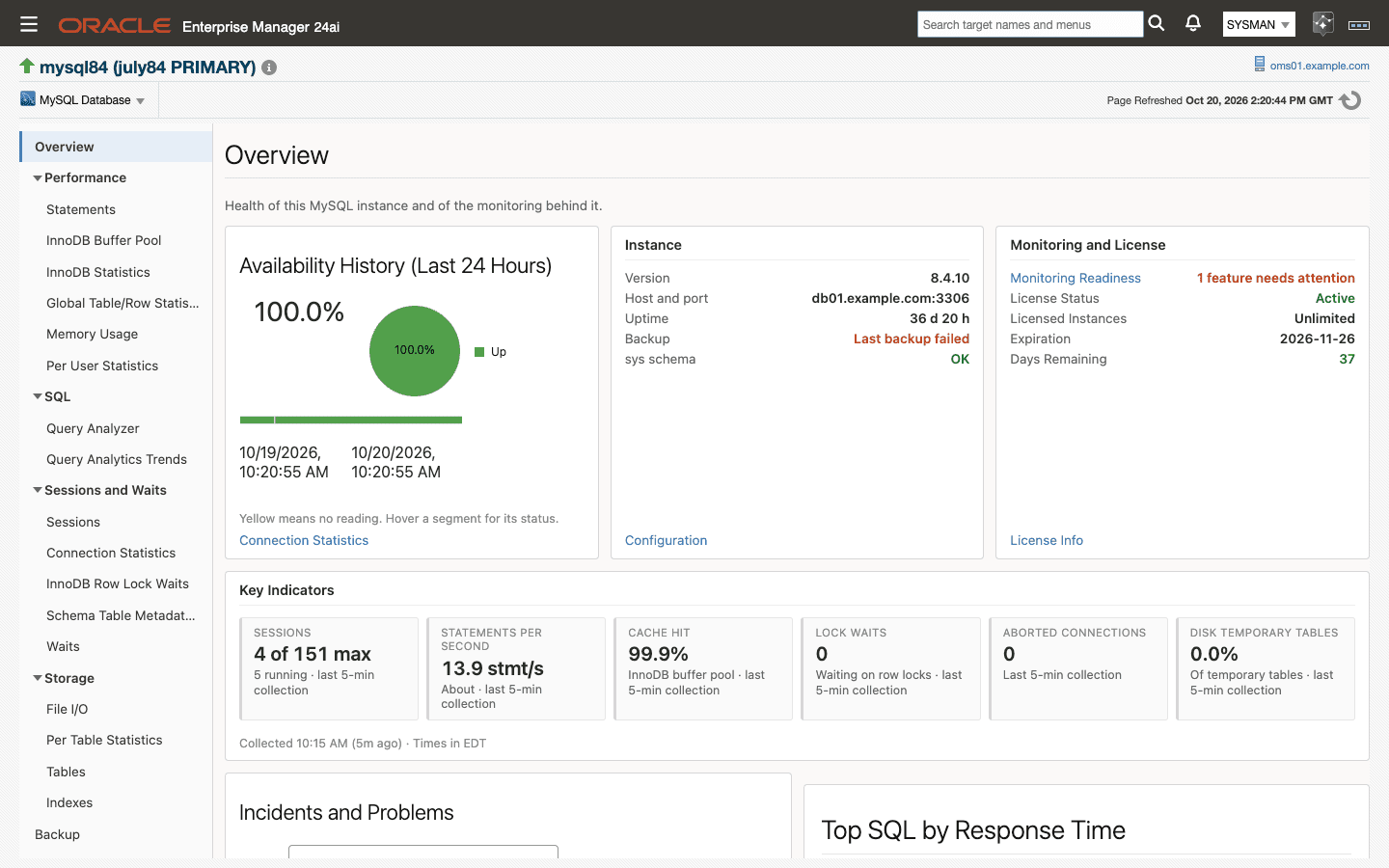
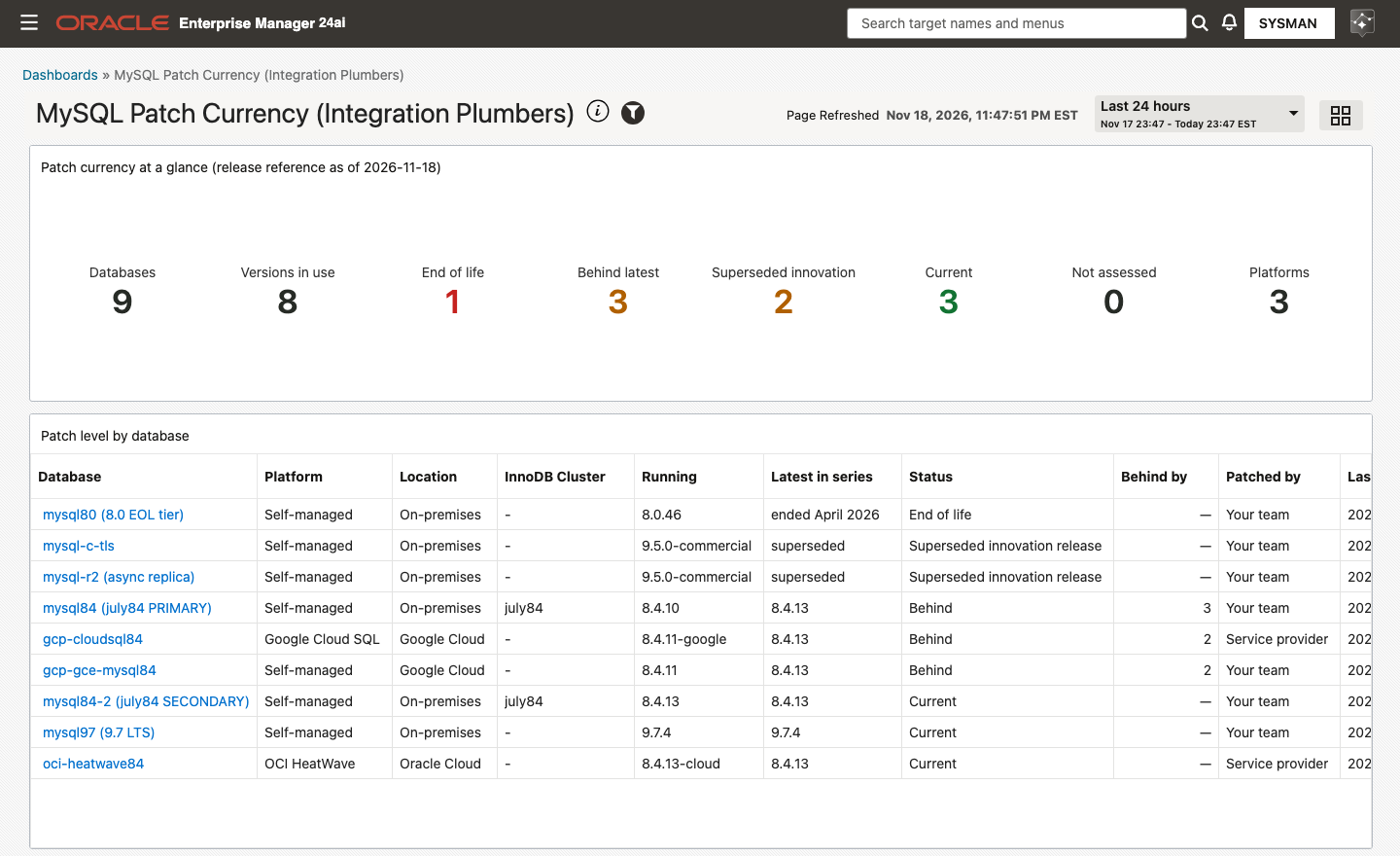
Both dashboards are Enterprise Manager Dashboards, found under Enterprise > Dashboards in Enterprise Manager 24ai. They read the EM repository only, so opening one adds no load to your MySQL servers. The screenshots in this post come from our lab fleet: nine MySQL databases across a data center, Google Cloud, and Oracle Cloud, deliberately left at different patch levels.
Patch Currency: one status per database
The image at the top of this post is the first half of the Patch Currency dashboard. The counts across the top always add up to the number of databases, so nothing is left out of the picture. In our lab that is 1 end of life, 3 behind, 2 on a superseded innovation release, and 3 current.
The table underneath is sorted with the furthest behind first. For each database it shows:
- Platform, worked out from what the server itself reports: Google Cloud SQL, Amazon RDS or Aurora, Azure Database for MySQL, OCI HeatWave, or self-managed.
- Location, taken from the standard Enterprise Manager Location property on the target. This is how a self-managed server on a cloud virtual machine is told apart from one in the data center, since the two look identical from the inside.
- Running version and the latest in series it is measured against.
- Status and Behind by, the difference in patch number.
- Patched by: your team, or the service provider.
That last column is the one that turns a list into a plan. In our lab, the Cloud SQL instance and the Compute Engine server are both on 8.4.11 and both two patches behind 8.4.13. The dashboard shows the first as patched by the service provider and the second as patched by your team. Same gap, different owner.
The status values are:
| Status | What it means |
|---|---|
| Current | Running the latest patch of its series, or later |
| Behind | The series is supported and a later patch exists |
| End of life | The series no longer receives patches |
| Superseded innovation release | An innovation release that a newer release has replaced |
| Not assessed | The version cannot be measured against the reference |
| Not collected | The target has not reported a version yet |
The dashboard reports patch level. It does not apply patches.
Versions and platforms
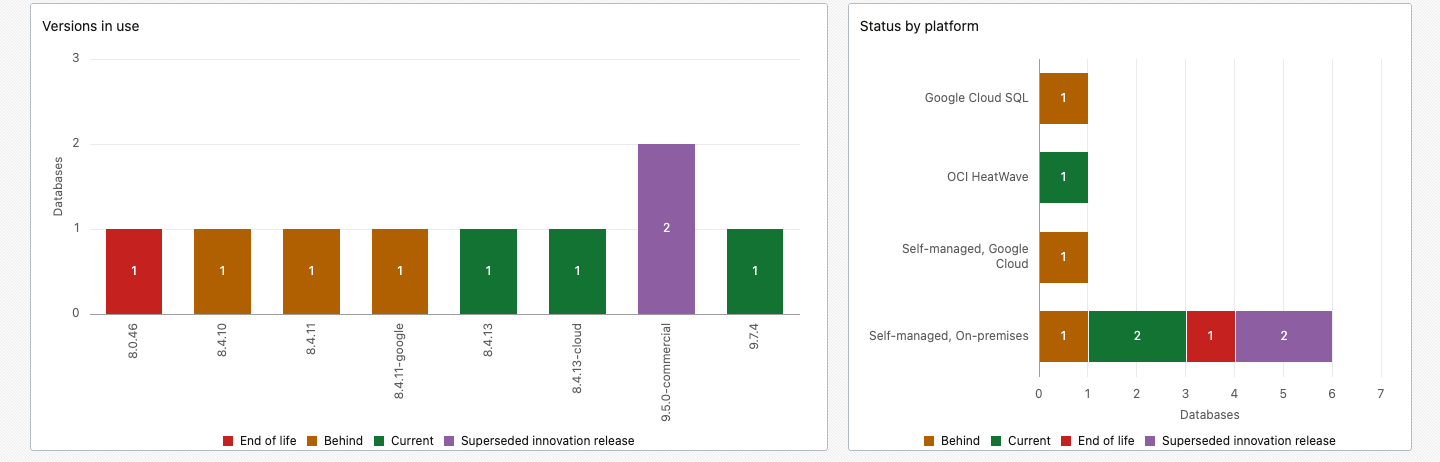
Two charts summarize the table. Versions in use counts databases per exact version string, colored by status. Eight distinct versions across nine databases is a finding in itself. Status by platform groups the same databases by where they run, and lists self-managed servers per location. For a team with a mixed footprint, this chart answers a question that otherwise takes real effort: which part of the estate is in the worst shape, and is that the part we patch ourselves?
Cluster drift, security, and what changed
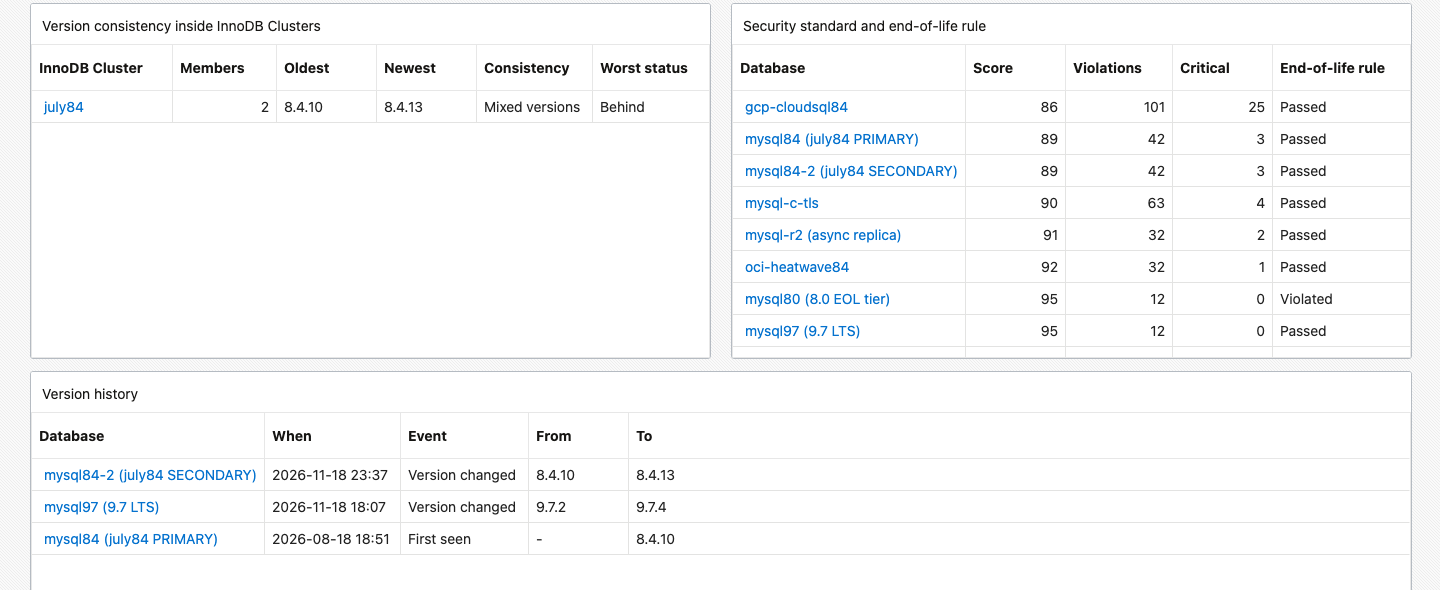
The lower half of the dashboard covers three things a version list cannot.
Version consistency inside InnoDB Clusters. Each cluster is listed with its oldest and newest member version, mixed clusters first. In our lab we upgraded one secondary from 8.4.10 to 8.4.13 and left the others alone. The cluster stayed online and healthy, and the dashboard reports it as "Mixed versions." That is what a half-finished rolling upgrade looks like, and it is easy to lose track of when the cluster itself is green.
Security standard and end-of-life rule. Each database appears with its score against the plug-in's MySQL Security Standard, its violation counts, and the result of the end-of-life compliance rule. Patch level and security posture are usually reviewed by the same people, so they are on the same page.
Version history. Enterprise Manager already records configuration changes for every target. The dashboard reads that history and lists each version change with its timestamp. After a patch window you can confirm what actually moved, and when, without asking anyone.
MySQL Fleet: the page before the patch page
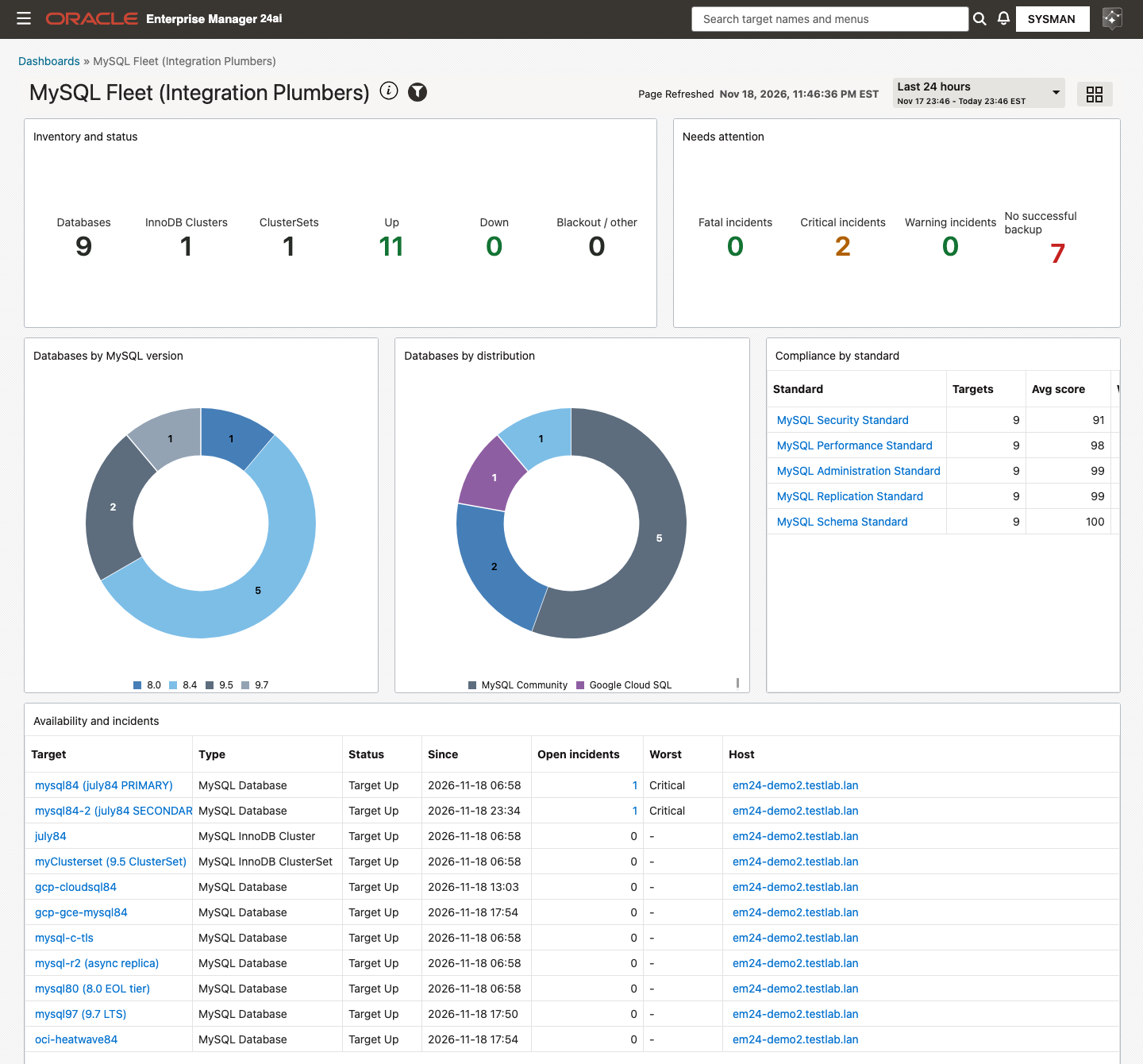
The MySQL Fleet dashboard is the wider view. It covers inventory and status, a "Needs attention" count of open incidents and databases with no successful backup, databases by version and distribution, average compliance score by standard, availability with open incidents per target, InnoDB Cluster and ClusterSet health, backup protection, replication channels, and load and capacity outliers. Every database name links to that database's own pages.
It is the page to open first on a Monday. Patch Currency is the page to open before a maintenance window.
What we found monitoring MySQL on Google Cloud
A dashboard that claims to cover the whole fleet is only as good as the platforms the plug-in can monitor. So before building the dashboards into a demo, we created real fixtures in Google Cloud and ran the generally available plug-in against them from an Enterprise Manager agent in our lab.
Cloud SQL for MySQL 8.4 is certified
We certified Google Cloud SQL for MySQL 8.4 on November 18, 2026, against a Cloud SQL Enterprise edition instance running 8.4.11.
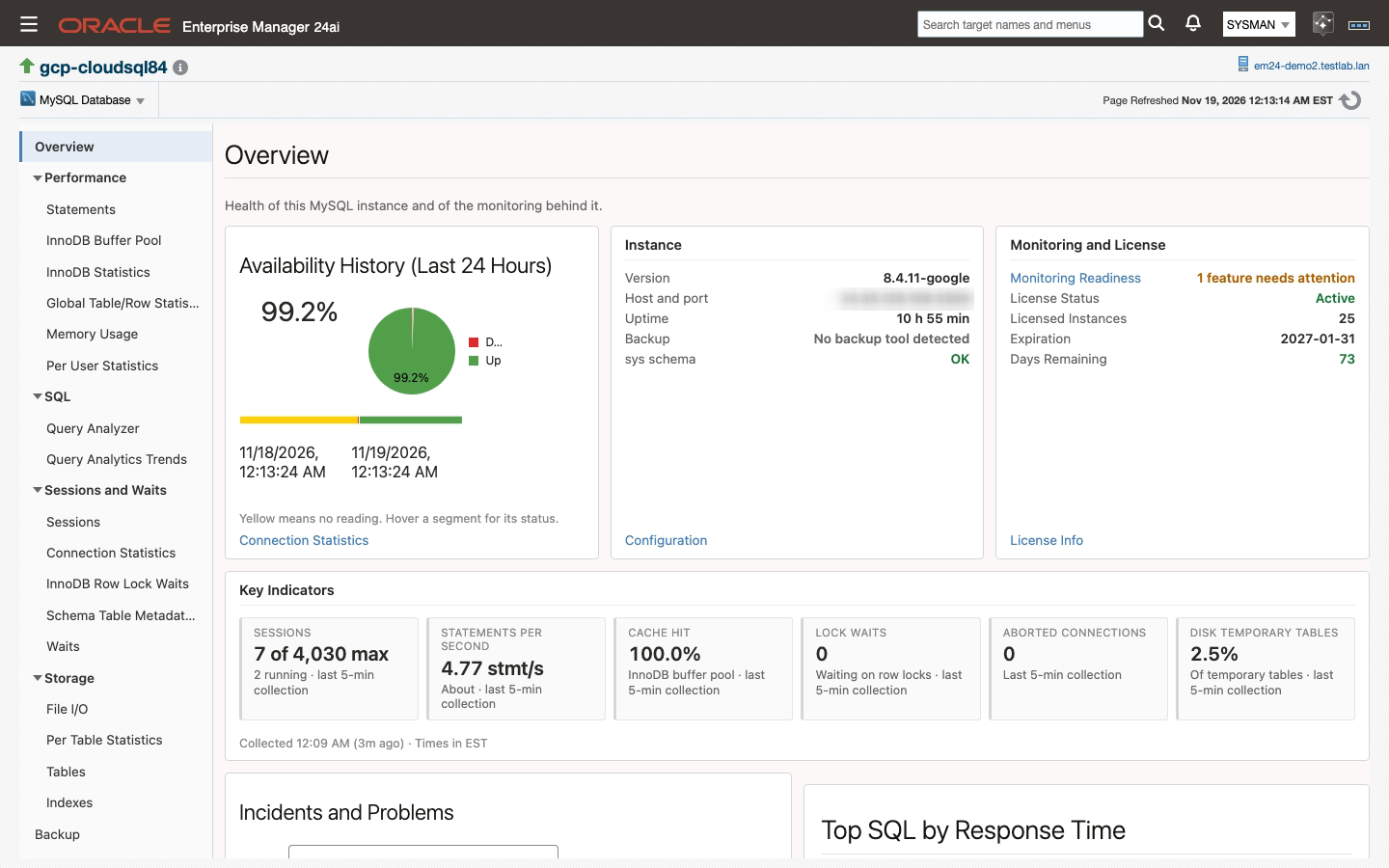
The results:
- 52 metric groups held current data, with zero collection errors after the instance settled.
- Every metric group our self-managed MySQL 8.4 reference server collects was present, except five that a standalone managed instance cannot have: backup history from MySQL Enterprise Backup or XtraBackup, and four replica-channel groups.
- All 65 compliance rules across the five standards evaluated.
- The standard monitoring account worked as documented. It needs three privileges,
SELECT,PROCESS, andREPLICATION CLIENT, and the instance'srootaccount could grant them as written.
Nothing is installed on the database side. The plug-in runs in the Enterprise Manager agent and connects over JDBC with TLS, read-only, so adding a Cloud SQL instance takes a host, a port, and a credential. Those are the same steps as for a server in your data center.
What Cloud SQL does differently
Four things are worth knowing before you add a Cloud SQL instance:
performance_schemamay be off. It was off on our 8 GB instance as Google created it. With it off, the plug-in still collected 31 metric groups with no errors, but the statement, wait, I/O, memory, table, and index pages have nothing to read. Turning it on is a database flag, and setting that flag restarts the instance, so plan for it.- TLS 1.2 only. Cloud SQL refused a TLS 1.3 handshake. Set the target's TLS Mode to
required. The instance accepts unencrypted connections by default, but the login then fails, sorequiredis the setting that works. - Network path. A public IP address accepts connections only from the ranges you list as authorized networks, so the agent host's outbound address goes there. No load balancer is needed. A private IP address needs an agent inside the VPC network or one that reaches it over Cloud VPN or Cloud Interconnect.
- Backups are Google's. Cloud SQL backups are not MySQL Enterprise Backup or XtraBackup runs, so the plug-in's backup thresholds stay silent. Watch those backups in Google Cloud.
The security findings you cannot fix, and the ones you can
Our Cloud SQL instance, exactly as Google created it, scored 86 on the MySQL Security Standard with 101 violations. That number needs reading carefully.
Twenty-one of the findings were accounts without a password. Every one of them is a Google service account that the service creates and that can log in only from the instance itself. The rule is reporting what is there. You cannot change those accounts, and suppressing the rule for them is reasonable.
The rest are choices you do control through database flags and instance settings: secure transport not required, no password validation, no failed-login throttling, and binary logging off while automated backups are off. Those are worth an afternoon.
MySQL on Compute Engine
We also installed MySQL Community 8.4.11 on a Compute Engine virtual machine and monitored it from the same lab agent, across the internet, with TLS required. It collected 52 metric groups with zero errors. That is the expected result, because MySQL on a virtual machine is an ordinary self-managed server, and it is covered by the plug-in's existing support for self-managed MySQL 8.4. It matters because virtual machines are where a large share of cloud MySQL actually runs, and those servers are still yours to patch.
On the Patch Currency dashboard that server appears as "Self-managed" with the location "Google Cloud," one row below the Cloud SQL instance.
What ships on December 1
Update 1 of the MySQL Plug-in for Oracle Enterprise Manager is scheduled for December 1, 2026. For a mixed fleet like the one described in this post, it brings:
- The MySQL Fleet and MySQL Patch Currency dashboards for every customer, for Enterprise Manager 24ai.
- MySQL Router as its own target type, with its own pages and thresholds, linked to the InnoDB Cluster or ClusterSet it serves.
The Google Cloud SQL certification does not wait for the update. We ran it on the generally available plug-in, so a Cloud SQL for MySQL 8.4 instance can be added as a target today. That puts Google Cloud on the certified list with AWS (Amazon RDS and Aurora) and OCI (MySQL HeatWave). Azure Database for MySQL is supported as well.
"Which servers are behind on patches?" should be a question with a quick answer. With the data center servers, the cloud virtual machines, and the managed instances in one repository, it is: one page, one status per database, and a name next to every gap. For the team that has to plan the next maintenance window, that means the meeting starts with the list instead of ending with it.
We covered three things: why a mixed fleet is hard to keep patched, what the two dashboards show, and what we found on Google Cloud. Here is where to go next.
See it live on December 2
Introducing the MySQL Plug-in for Oracle Enterprise Manager Wednesday, December 2, 2026 · 1:00 PM ET · 60 minutes, with live Q&A
We will walk through both dashboards and the Google Cloud targets shown in this post, along with query analysis and on-demand EXPLAIN, backup monitoring, InnoDB ClusterSet disaster-recovery readiness, and the built-in compliance rules. If you cannot make the time, register anyway and we will send you the recording and slides.
- Register for the webinar
- MySQL Plug-in for Oracle Enterprise Manager, including the free 30-day trial
Does the Patch Currency dashboard apply patches?+
No. It reports the patch level of every monitored MySQL database and who is responsible for applying patches. Patching itself stays with your team, or with the service provider for a managed service.
How does the dashboard know what the latest MySQL release is?+
It measures each database against a release reference that holds the latest patch of each supported series and the series that have reached end of life. The date of that reference is shown in the title of the first section of the dashboard, so you can always see how current the comparison is.
Do the dashboards put any load on my MySQL servers?+
No. Both dashboards read the Oracle Enterprise Manager repository, which already holds what each target has reported. They do not open connections to your MySQL servers.
Which Enterprise Manager release do the dashboards need?+
Enterprise Manager 24ai at a Release Update that includes the Dashboards feature with custom query widgets, which is Release Update 5 or later. The plug-in itself also supports Enterprise Manager 13.5, but the dashboards use a 24ai feature.
My Cloud SQL instance shows as behind. What should I do about it?+
Start with the "Patched by" column. A Cloud SQL instance is patched by Google, on Google's maintenance schedule, and it is measured against the latest upstream MySQL release, which the provider may not offer yet. Treat the status as information for planning your maintenance windows, not as an overdue task.
How does the dashboard tell a cloud virtual machine from a data center server?+
From the inside they look the same, so the dashboard uses the standard Enterprise Manager Location property on the target. Set it once per target, for example to "Google Cloud" or "On-premises," and the Location column and the Status by platform chart use it.
Does anything need to be installed on the Cloud SQL instance or the Compute Engine VM?+
No. The plug-in runs in the Enterprise Manager agent and connects to MySQL remotely over JDBC with a read-only monitoring account. One agent can monitor many endpoints, and it does not have to be in the same network as long as it can reach the database port.
Is MySQL on Compute Engine a separately certified platform?+
It does not need to be. MySQL installed on a Compute Engine virtual machine is a self-managed MySQL server, which the plug-in already supports. We ran MySQL Community 8.4.11 on a Compute Engine VM in our lab and it collected the same metric groups as a server in the data center, with zero errors.