If you ran MySQL Enterprise Monitor, you have already moved your MySQL monitoring once. MEM reached end of life in January 2025, and Oracle pointed its users to Oracle Enterprise Manager for MySQL, the plug-in that put MySQL targets into the Oracle EM console. Oracle has since published a deprecation notice for that plug-in through My Oracle Support, so the teams that made the first move are now planning a second.
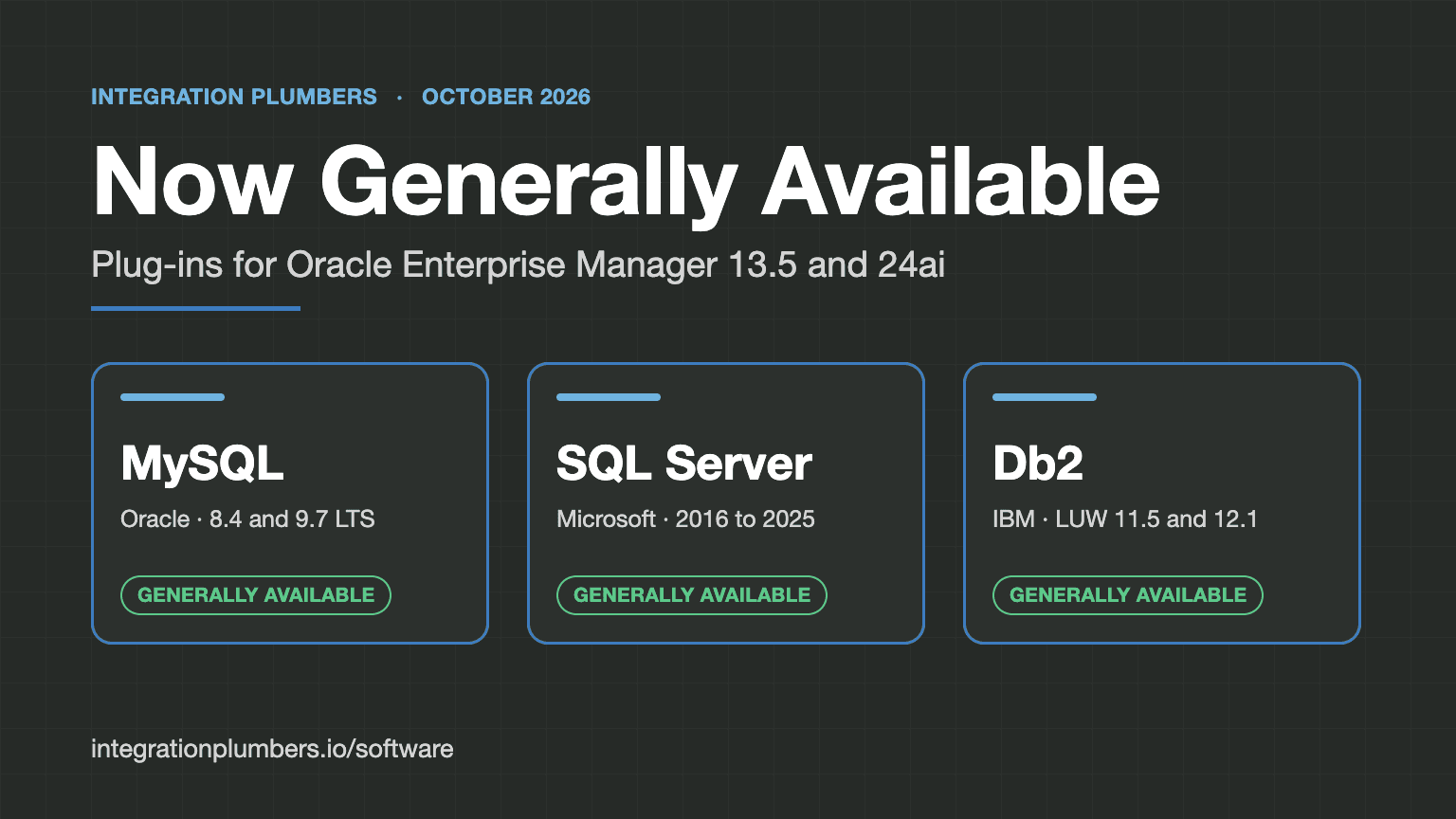
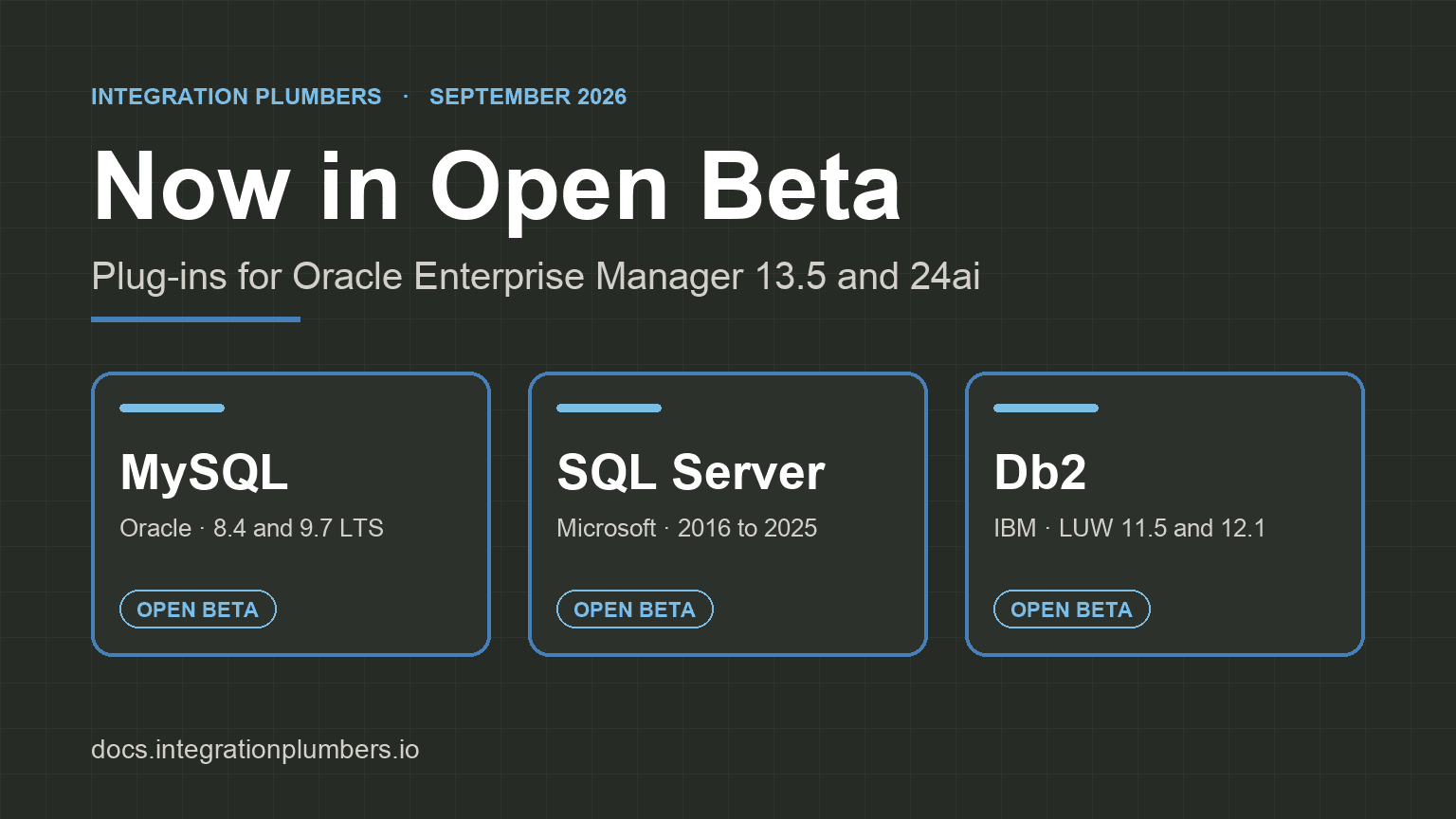
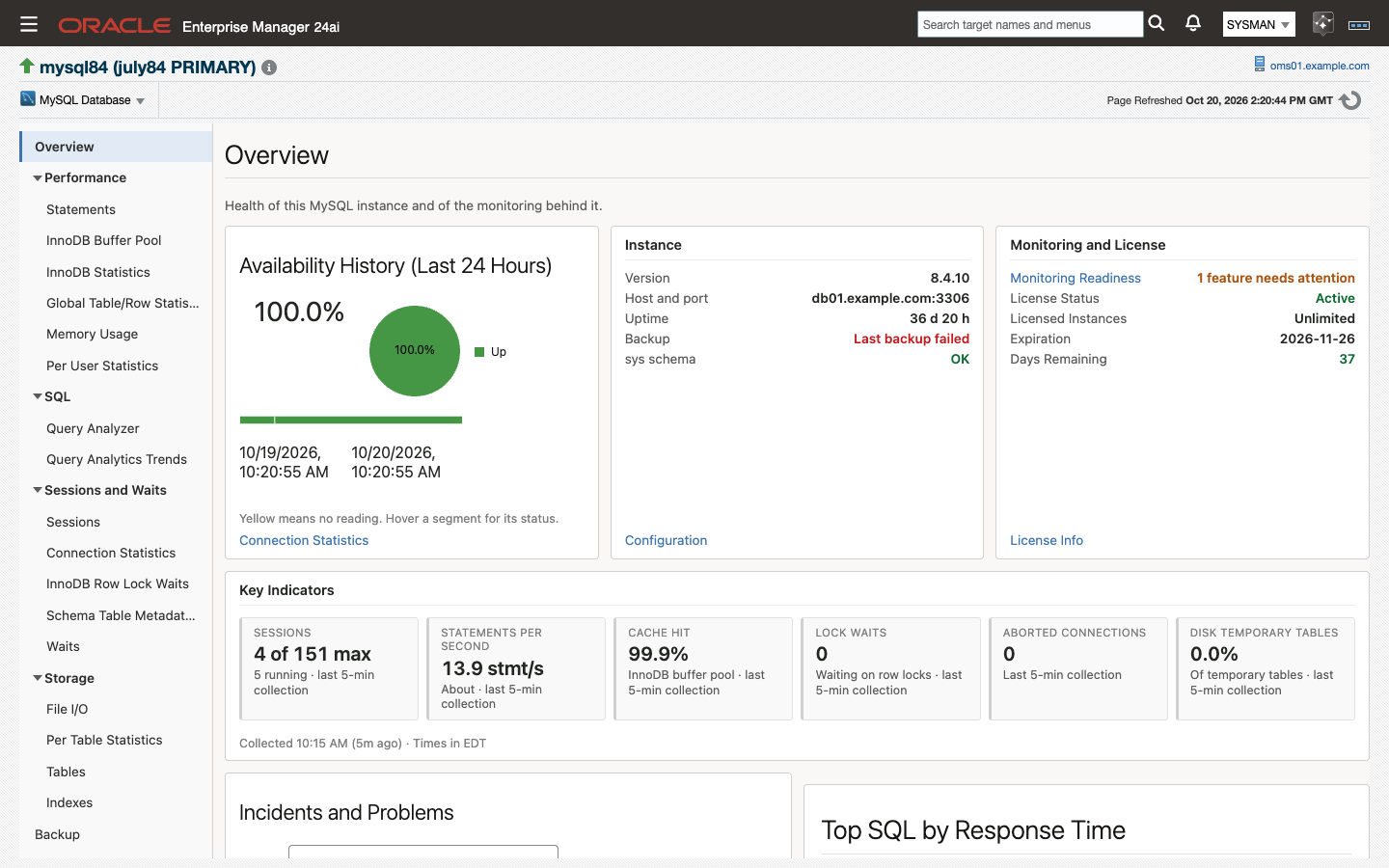
We wrote about that sequence in July, in After MEM, and said what our plug-in would restore. That post described a product in Early Access. The MySQL Plug-in for Oracle Enterprise Manager has been generally available since October 23, 2026, so this post goes through what the GA release does, set against both of the products it follows, with screenshots from the GA build.
This post has five parts: the comparison at a glance, what came back from MEM, what it adds to Oracle's plug-in, what is new in this plug-in, and how to move without a monitoring gap.
The comparison at a glance
The first table covers what MEM had, what Oracle's plug-in carried over, and what the GA release ships.
| MySQL Enterprise Monitor | Oracle's plug-in | Integration Plumbers GA | |
|---|---|---|---|
| Status | End of life, January 2025 | Deprecation notice published through My Oracle Support | Generally available since October 23, 2026 |
| Console | Its own console and server | Oracle Enterprise Manager | Oracle Enterprise Manager 24ai and 13.5 |
| Backup monitoring | Dashboard for MySQL Enterprise Backup | None | Backup page and three default alerts, for MySQL Enterprise Backup and Percona XtraBackup |
| Advisors and compliance | 14 advisor categories | 29 rules in five groups | 65 rules in five standards |
| Security checks | About two dozen advisors | 5 rules | 36 rules |
| Version support check | Yes | None | Yes, as a compliance rule |
The second covers the places where Oracle's plug-in and the GA release answer the same question differently.
| Oracle's plug-in | Integration Plumbers GA | |
|---|---|---|
| Query history | Query Analyzer shows a point-in-time snapshot | Query Analytics Trends keeps each statement's history for the last day, week and month |
| ClusterSet health | Read from the one member the plug-in is connected to | A DR Promotion Ready verdict from the MySQL Shell AdminAPI, across every cluster |
| Default alerts on cluster and ClusterSet targets | Availability only | Availability, four cluster thresholds and two ClusterSet thresholds |
| Monitoring account | SELECT, REPLICATION CLIENT, SHOW DATABASES, PROCESS, EXECUTE | SELECT, PROCESS, REPLICATION CLIENT |
What came back from MEM
MEM was a separate console with its own way of doing each job. The GA release rebuilds four MEM features on the Oracle EM mechanism that does the same job: the backup dashboard is a page backed by metric alerts, the advisors are compliance rules, and the preset alerts are default thresholds that raise ordinary incidents.
Backup monitoring
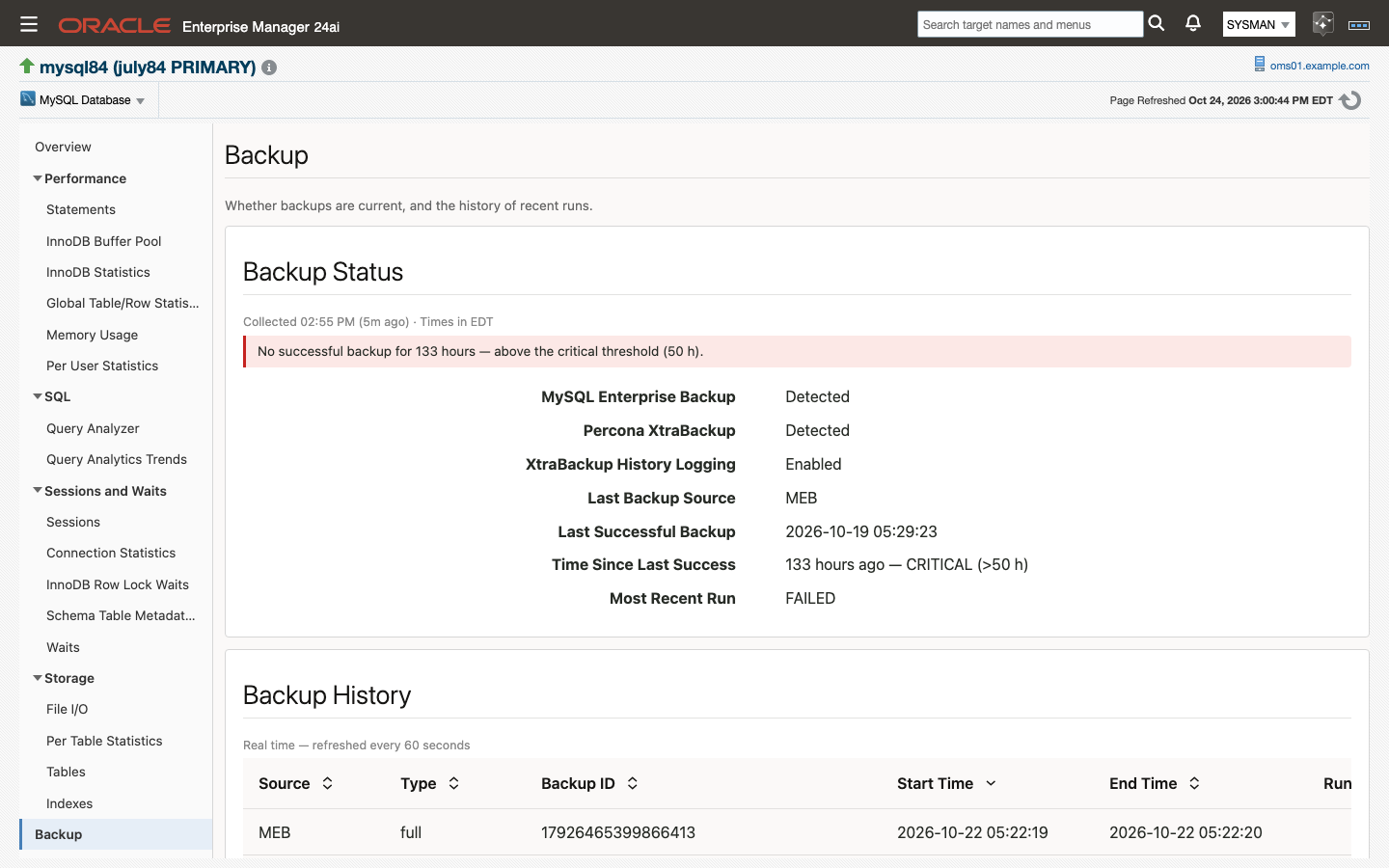
MEM had an Enterprise Backup dashboard. It read the history tables that MySQL Enterprise Backup writes and told you whether last night's backup succeeded.
The GA release has a Backup page on every MySQL Database target. It reads mysql.backup_history for MySQL Enterprise Backup and PERCONA_SCHEMA.xtrabackup_history for Percona XtraBackup, which records history when it runs with --history. Every hour the plug-in collects the last successful backup and its age, the outcome of the most recent run, and the run history, including the end LSN and the binary log position you need for point-in-time recovery.
Three alerts ship turned on: backup age past 26 hours (warning) and 50 hours (critical), the most recent backup failed, and no backup has ever succeeded. The screenshot shows a lab server whose backups stopped. The last success was 133 hours earlier and the most recent run failed, so the target has an open critical incident in Oracle EM.
The page reports only what the server records. A logical dump or a storage snapshot leaves no history in MySQL, so the page shows it as not detected, and a tool you never installed raises no alert. XtraBackup writes no history row when a run fails, so on an XtraBackup-only estate, backup age is the failure signal.
The advisor catalog, as compliance rules
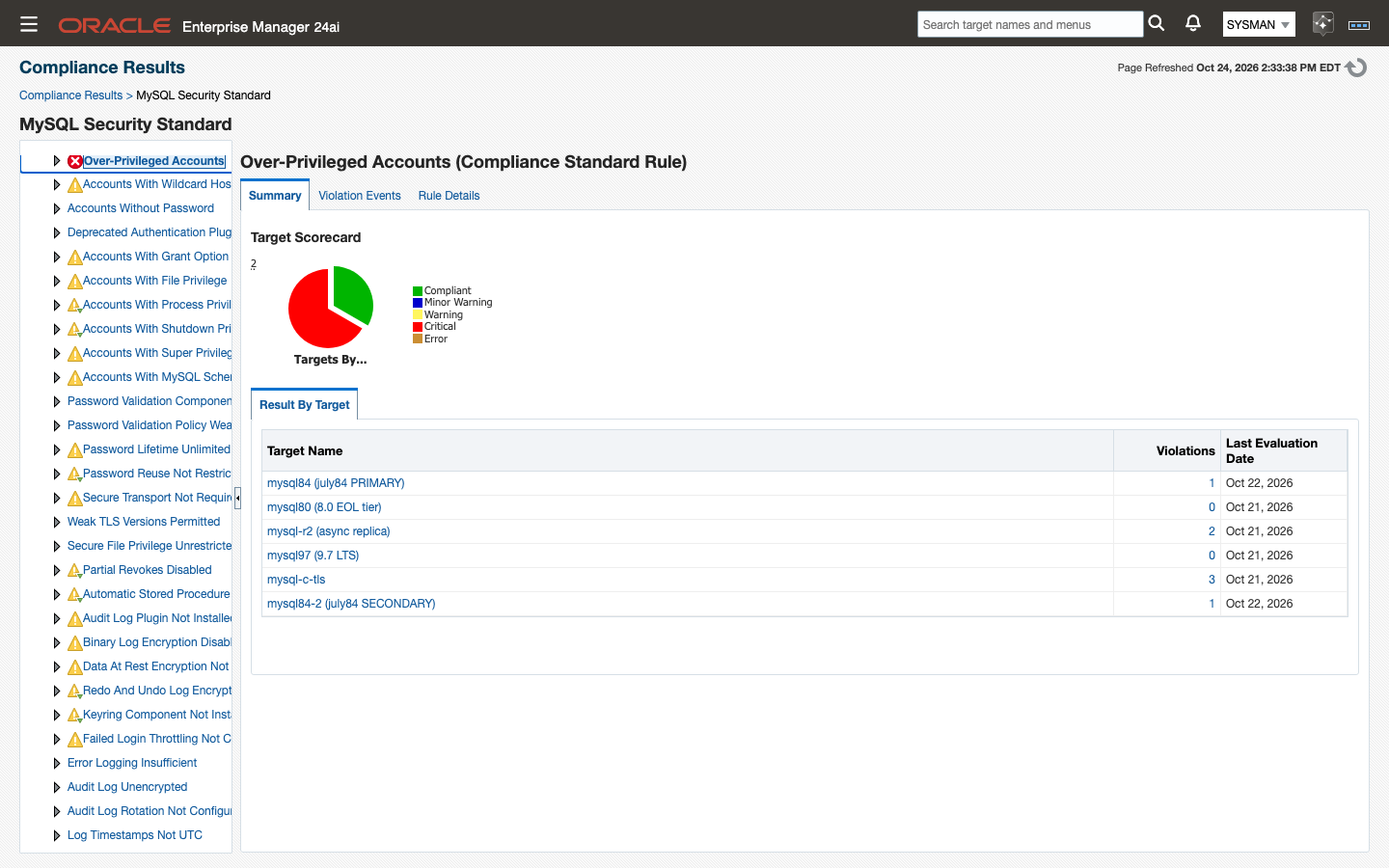
MEM ran 14 categories of advisors. Oracle's plug-in carried 29 of those checks as compliance rules, five of them for security. The GA release ships 65 rules in five standards: Administration (14), Performance (2), Replication (11), Schema (2) and Security (36).
The Security standard checks accounts and privileges, password policy, audit logging, encryption and transport. Five of its rules are rated critical: anonymous accounts exist, root permits remote login, over-privileged accounts, accounts without a password, and the password validation component is not installed.
The rules run in Oracle EM's own compliance framework against a daily configuration snapshot. MySQL results appear on the same Compliance pages, with the same scores and history, as your Oracle Database targets. You associate the five standards with a target and write no rules yourself.
A check for servers past end of life
MEM had an advisor named "MySQL Server No Longer Eligible For Oracle Premier Support." The Administration standard in the GA release has the equivalent, MySQL Series Past End Of Life, which flags every server still on the 8.0 series. MySQL 8.0 has been out of support since April 2026, so the rule's violation list is your list of servers left to upgrade. The rule is advisory. The plug-in keeps monitoring a server whatever version it runs.
Thresholds that ship set
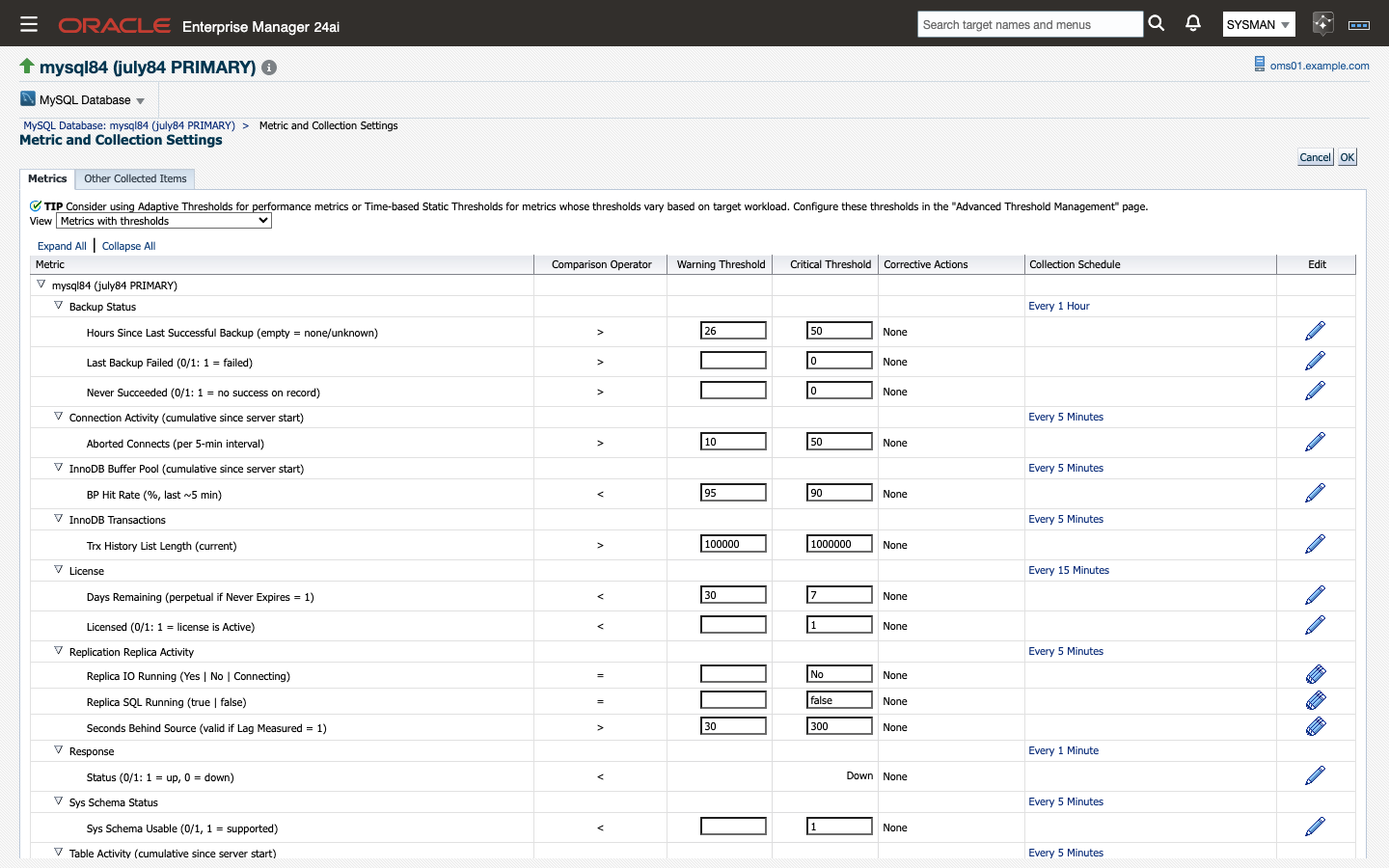
MEM shipped with its alert thresholds set, so a new server was covered on the day you added it. The GA release does the same with 22 default thresholds and an availability condition on each target type.
A new MySQL Database target alerts on replica lag (30 and 300 seconds), stopped replication threads, buffer pool hit rate, connection saturation, aborted connections, InnoDB history list length, disk temporary tables, wait time and the three backup conditions. Each one raises an ordinary Oracle EM incident, which follows the incident rules, notifications and ticketing connector you already have.
The values are starting points. Review them against your own service levels on the Metric and Collection Settings page, shown above, or set them across a fleet with a monitoring template.
What it adds to Oracle's plug-in
Query history
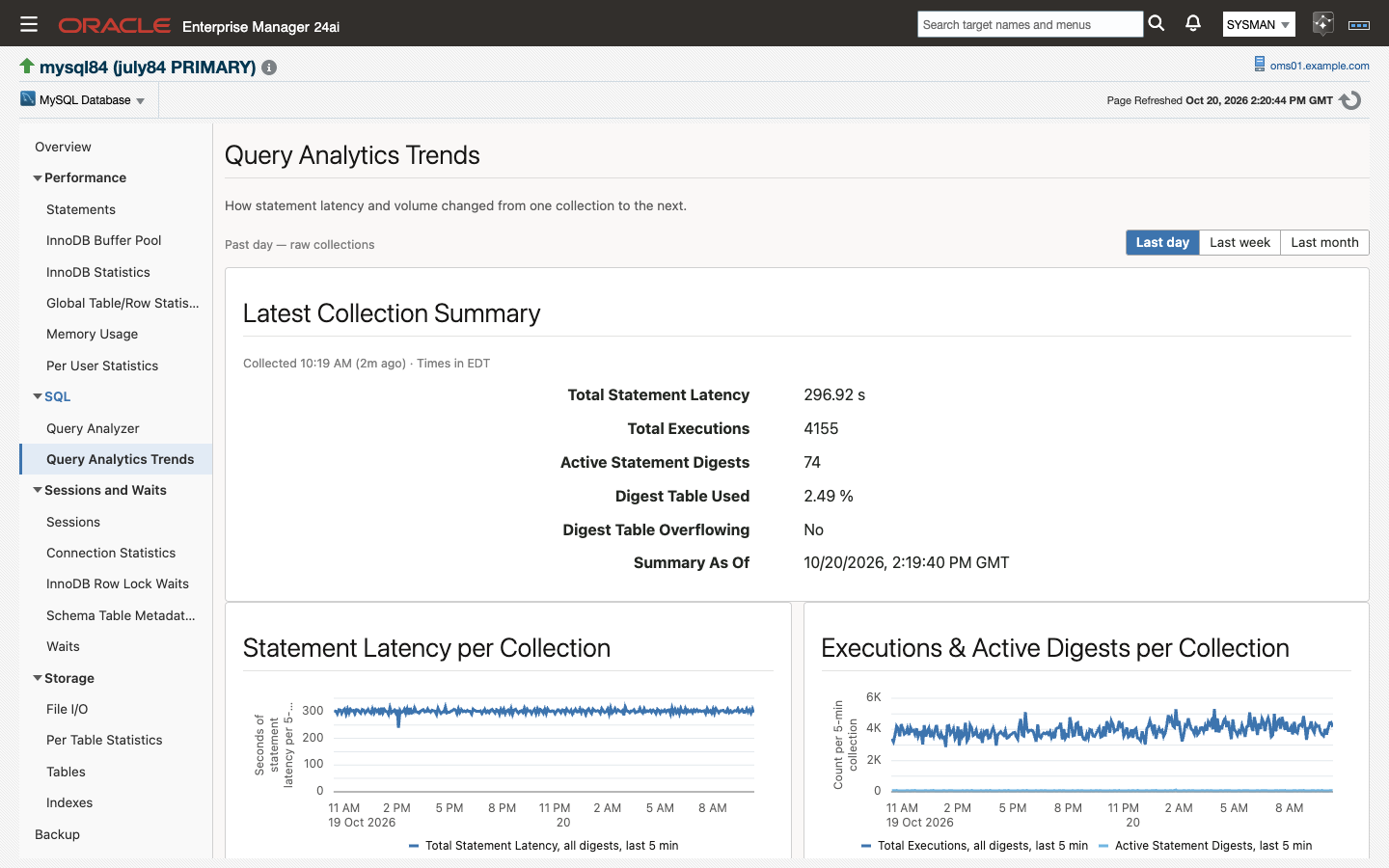
Oracle's plug-in has a Query Analyzer that shows a snapshot: the statement digests as the server holds them when you open the page. The server's totals are cumulative and reset on restart, so telling whether a statement got slower this week takes stored history.
The GA release keeps the live Query Analyzer, refreshed every 60 seconds, and adds Query Analytics Trends. Every five minutes the plug-in stores the figures for the top 25 statement digests in the Oracle EM repository. The page charts total statement latency and executions per collection, and ranks the heaviest statements over the last day, week or month by latency, by executions, or by executions that used no index. It also shows how full the server's digest table is, which tells you when the Performance Schema has started to drop statements.
The Last day window is exact. Last week and Last month are built from Oracle EM's hourly and daily rollups, so their totals are estimates. The history keeps each statement's digest hash and its figures, not its text.
From Query Analyzer you can also take a plan. Select a statement, fill in its placeholders and click Explain. The job asks the server for the plan without running the statement.
Whether a replica cluster can be promoted
On an InnoDB ClusterSet, the question during an outage is whether a replica cluster can be promoted without losing transactions. Oracle's plug-in reports ClusterSet state as the member it is connected to sees it. The GA release adds an assessment across every cluster, so a replication channel that is broken on another cluster, or a replica cluster that is far behind, counts toward the answer.
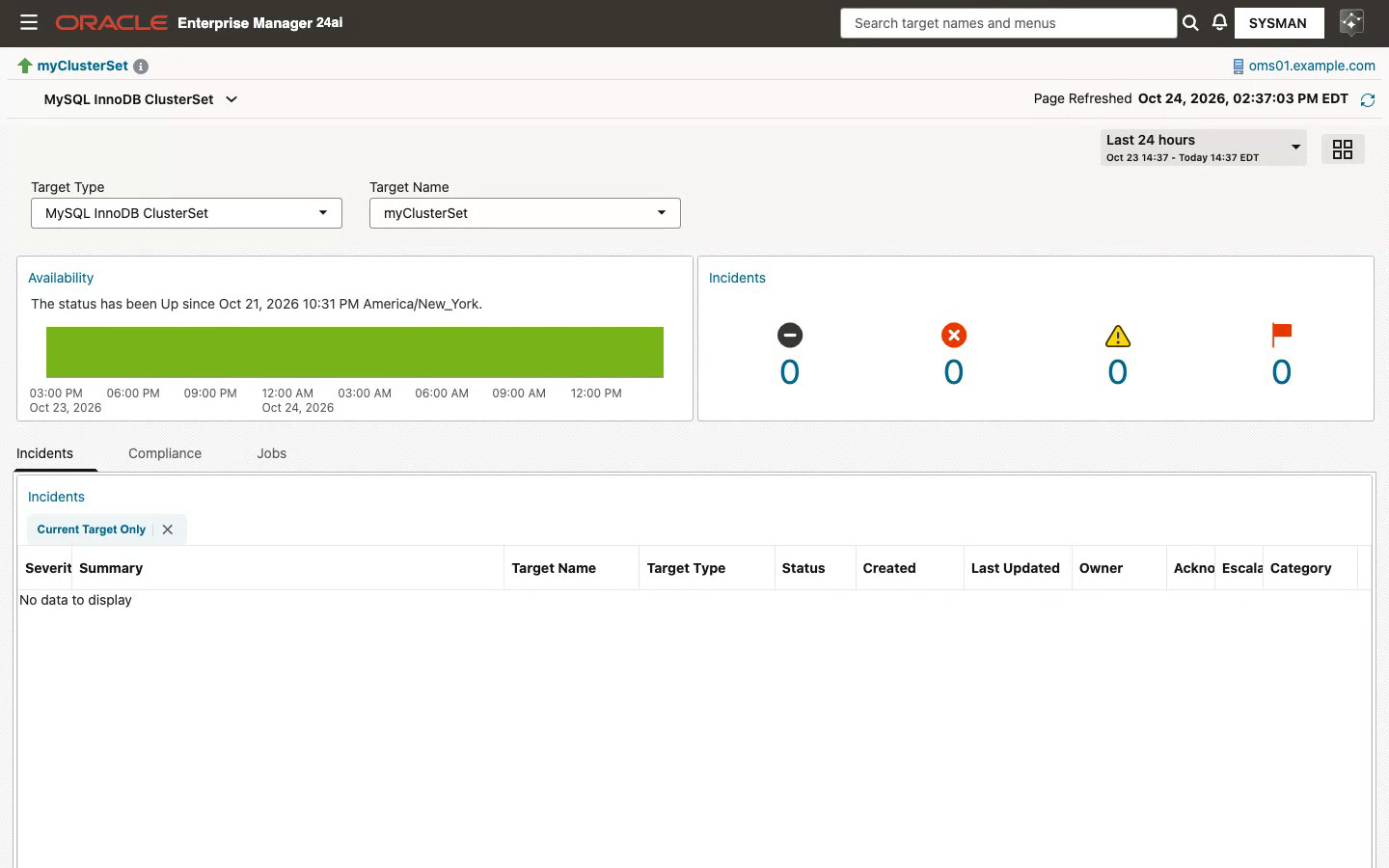
Above is a ClusterSet as a target of Oracle's plug-in: it is Up and has no incidents. Below is the same ClusterSet, in the same Oracle EM, as a target of the GA release.
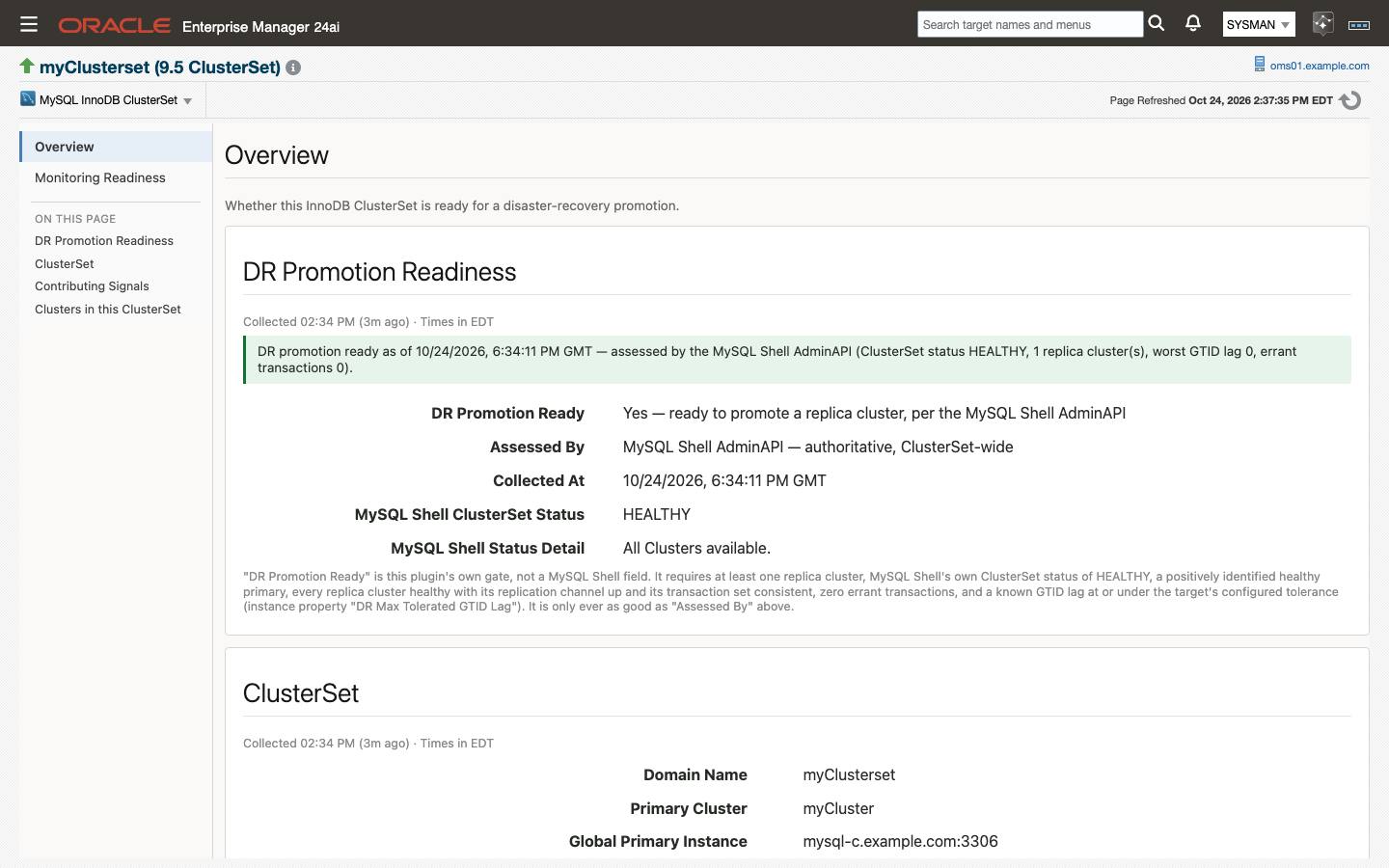
Every five minutes the plug-in runs clusterSet.status() through the MySQL Shell AdminAPI, which opens sessions to the members of every cluster. From the result it gives one verdict, DR Promotion Ready. The verdict is Yes only when all of these hold:
- There is at least one replica cluster, and MySQL Shell reports the ClusterSet as HEALTHY.
- A healthy primary is positively identified.
- Every replica cluster is healthy, its replication channel is up and fresh, its transaction set is consistent, and it has no errant transactions.
- The GTID lag is known and within the tolerance you set on the target.
The verdict is stricter than MySQL Shell's own status. During a network partition, MySQL Shell can still report HEALTHY while the plug-in reports not ready. The page shows every signal behind the verdict and names the tool that assessed it.
A check that could not run reports "not assessed," not a failure. If MySQL Shell is missing from the agent host, or the agent host cannot reach the primary cluster, the page says so and a separate warning names the cause. The critical DR alert fires only after two consecutive checks that ran and failed. MySQL Shell has to be installed on the agent host.
Group Replication, member by member
The MySQL InnoDB Cluster target adds three pages built from the Group Replication counters: Consensus, Messaging and Certification. Each shows a table per member for the current window and a 24-hour chart, which lets you tell a slow network from a slow database.
Oracle's plug-in alerts on availability for cluster and ClusterSet targets. The GA release adds default thresholds on the applier queue, the certification queue and average consensus time for a cluster, and on DR Promotion Ready for a ClusterSet.
A smaller monitoring account
Oracle's documentation gives its plug-in's monitoring account five privileges: SELECT, REPLICATION CLIENT, SHOW DATABASES, PROCESS and EXECUTE. The GA release needs three:
CREATE USER 'em_monitoring'@'%' IDENTIFIED BY '<strong password>';
GRANT SELECT, PROCESS, REPLICATION CLIENT ON *.* TO 'em_monitoring'@'%';
The account has no SUPER and no write privilege. The plug-in runs no DDL, no DML and no SET GLOBAL. With TLS Mode set to required, a session that cannot be encrypted fails and the target goes Down. The plug-in does not fall back to plaintext.
What is new in this plug-in
Monitoring Readiness
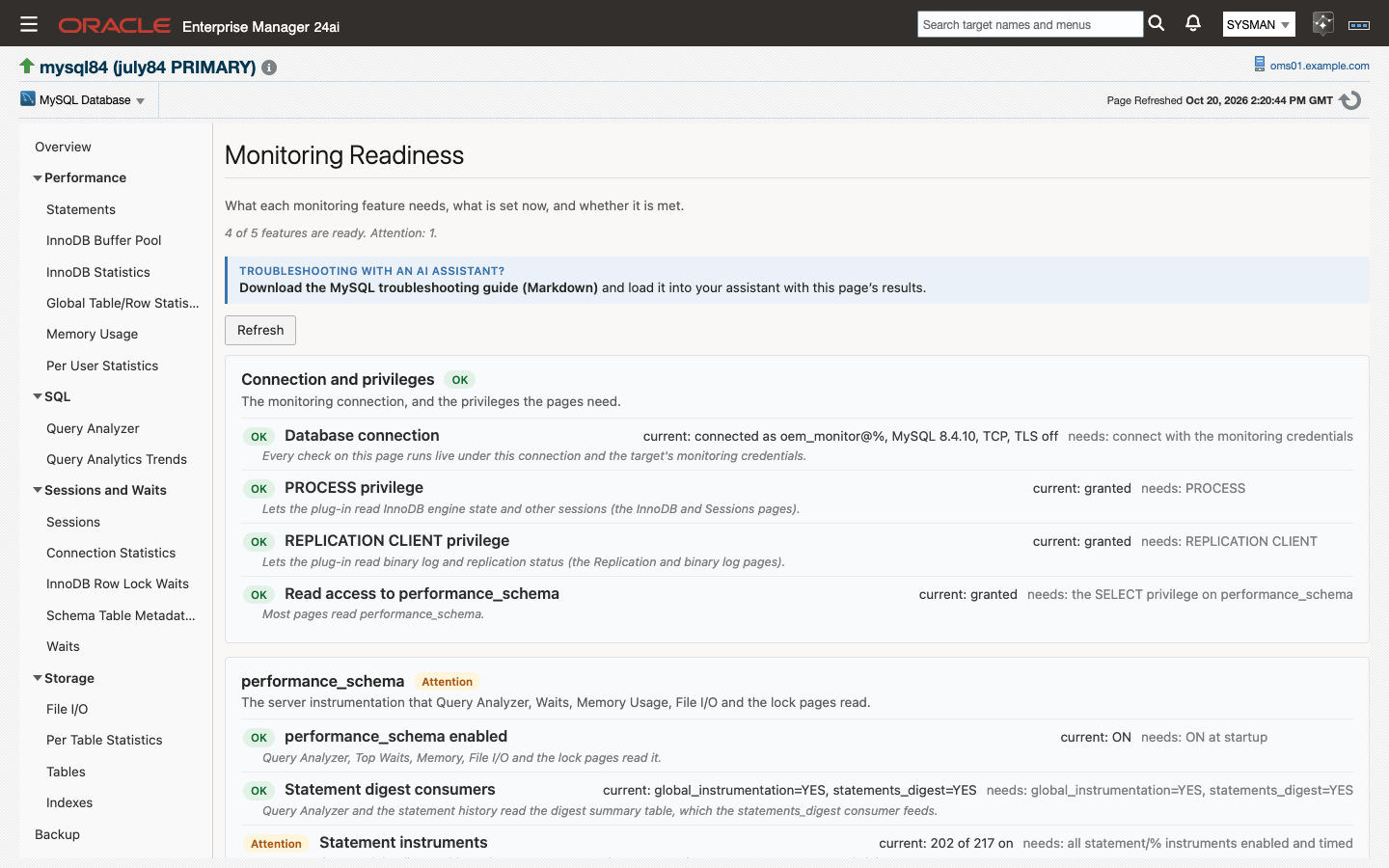
A monitoring tool that is missing a privilege or a Performance Schema setting does not fail. It shows less, and the gap stays hidden until you need the missing page.
Monitoring Readiness checks, live, what each feature needs against what is set now: the monitoring account's privileges, the Performance Schema, the sys schema, the backup history tables and the license, plus MySQL Shell on a ClusterSet target. Each check is rated OK, Attention, Not functional or Unknown. Where the fix is a SQL statement, the page prints it for you to run.
The page also links a troubleshooting guide written for AI assistants, which you can load into your own assistant together with the page's results.
Waits, Tables and Indexes
Three more pages are new:
- Waits shows where the server spent its time, by wait class for each one-minute collection, over the last day, week or month, with the top 25 wait events for the window. Socket waits are totaled separately so that time spent waiting on clients does not hide contention inside the server.
- Tables shows how storage is shared between the 500 largest tables, from an hourly collection.
- Indexes lists index sizes and counts the tables read without an index, the indexes nothing has read, and the indexes another index already covers.
Current MySQL releases and managed MySQL
The GA release is certified on MySQL 8.4 LTS, 9.7 LTS, 9.5 commercial and the 26.10 innovation release, and on Amazon RDS for MySQL 8.4, Amazon Aurora MySQL 8.4 and OCI MySQL HeatWave 8.4. MySQL 8.0 is supported. The collection layer is written for the replication syntax that 8.4 kept, SHOW REPLICA STATUS and SHOW BINARY LOG STATUS, which the July post covered in detail.
Managed instances are added by endpoint. Collection runs over JDBC from a Management Agent, and nothing is installed on the database host.
Data an AI assistant can read
On Oracle EM 24ai Release Update 12 and later, Oracle EM's own MCP server gives AI clients read access to the data in the repository. The MySQL plug-in is validated with it. Its metric labels state what each value means and carry units, so a client can interpret a value without the documentation. The user guide has a chapter on what an assistant sees.
Moving from Oracle's plug-in
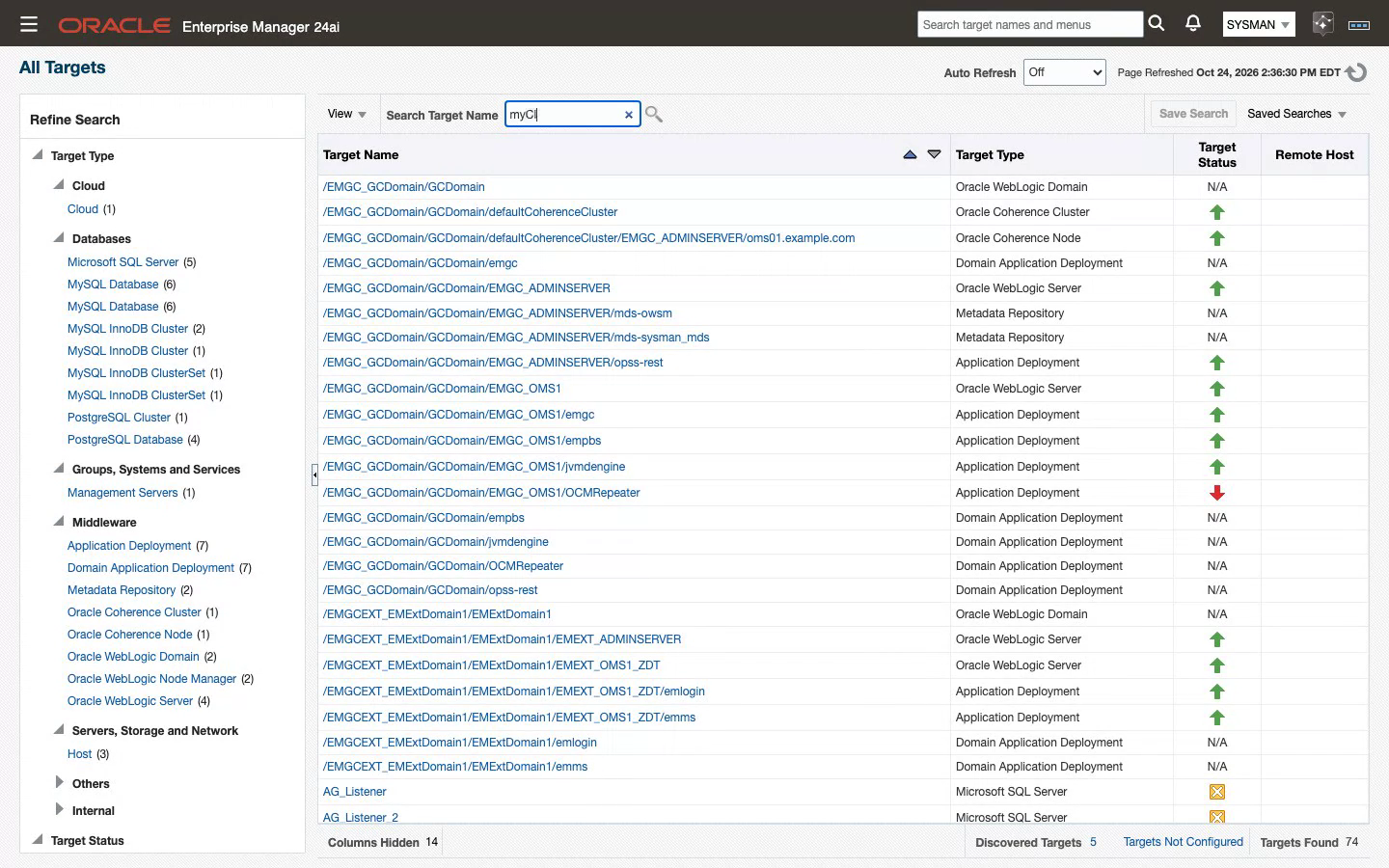
The GA plug-in has its own target types, so it installs beside Oracle's plug-in on the same Oracle EM. In the screenshot each MySQL target type is listed twice, once from each plug-in. Both monitor the same servers for as long as your change process needs, and you retire an old target when you are satisfied with its replacement.
Targets are registered again, not upgraded. An onboarding script, mysql-onboard.sh, exports your existing targets to a CSV, creates the replacements after a dry run, and waits for each one to be Up and licensed. It then associates the compliance standards, and it deletes an old target only when its replacement is Up.
A new target starts its own history on the day you add it. The old target keeps its history until you delete it, so keep it for as long as your retention policy needs.
Thresholds port by meaning, and a threshold copied by name can read the wrong number. Most metrics keep their names, but two changed units:
| Metric | Oracle's plug-in | Integration Plumbers GA | Porting a threshold |
|---|---|---|---|
| Statement latency | Picoseconds | Microseconds | Divide by 1,000,000 |
| Buffer pool hit rates | Per mille (1,000 = 100%) | Percent | Divide by 10 |
The migration chapter has every step and the full list of differences.
Check three things before you plan a cutover:
| Area | In this release | What to do |
|---|---|---|
| Agent platform | The agent side runs on Linux x86-64. | Give a target that is monitored from a Windows agent today a Linux agent that can reach the server. |
| TLS | TLS Mode is required or disabled. | Set TLS Mode to required on targets that connect over TLS today. It encrypts the session. |
| MySQL Connector/J and MySQL Shell | You supply both. Oracle licenses Connector/J separately. | Place one Connector/J jar on each agent host, and install MySQL Shell on agent hosts that monitor a ClusterSet. |
If you hold an Oracle entitlement for a MySQL plug-in, our Credit and Replace program credits the unused months of that term toward an Integration Plumbers license for the same instances. A 30-day trial key covers an unlimited number of instances with every feature turned on.
Is Oracle's MySQL plug-in for Enterprise Manager being retired?+
Oracle has published a deprecation notice for Oracle Enterprise Manager for MySQL through My Oracle Support, its channel for lifecycle notices to supported customers. If you run the plug-in, confirm the details in My Oracle Support or with your Oracle account team.
Can both plug-ins monitor the same MySQL server at the same time?+
Yes. The GA plug-in has its own plug-in ID and target types, so it deploys beside Oracle's plug-in on the same Oracle EM, and each server gets a second target. Both collect for as long as you need, and nothing about the old target changes until you delete it.
Does my metric history move to the new targets?+
No. A new target starts its own history on the day it is added. The old target keeps its metric history, incidents and compliance results for as long as it stays in Oracle EM, so keep it, or export the reports you need, until your retention period is covered.
Does it monitor backups the way MEM did?+
Yes, and it adds Percona XtraBackup. The Backup page reads the history that MySQL Enterprise Backup and XtraBackup record in the server, and three alerts ship turned on: backup age, a failed most recent run, and no backup ever succeeded. Logical dumps and storage snapshots leave no record in MySQL and are shown as not detected.
What access does the monitoring account need?+
SELECT, PROCESS and REPLICATION CLIENT, granted globally, with no SUPER and no write privilege. On a Group Replication cluster or a ClusterSet you create the account once on the primary and it replicates. The Monitoring Readiness page checks the grants on each target and prints the statement for anything missing.
Do I need to install anything on the database host?+
No. Collection runs over JDBC from a Linux Management Agent, which is usually remote. You place MySQL Connector/J on each agent host, and MySQL Shell on agent hosts that monitor a ClusterSet. An agent on the database host is needed only for a target that connects through a Unix socket.
Which MySQL versions and Oracle EM releases does it support?+
It is certified on MySQL 8.4 LTS, 9.7 LTS, 9.5 commercial and the 26.10 innovation release, on InnoDB ClusterSet with MySQL 8.4, and on Amazon RDS for MySQL 8.4, Amazon Aurora MySQL 8.4 and OCI MySQL HeatWave 8.4, with MySQL 8.0 supported. There is one build for Oracle EM 24ai and one for 13.5. The 13.5 line ships through GA Update 1, because Oracle's Extended Support for Oracle EM 13.5 ends on December 31, 2026.
How is it licensed, and what does moving cost?+
The plug-in is licensed per monitored MySQL instance, with support and updates included. InnoDB Cluster and ClusterSet targets are containers and need no license. If you hold an Oracle entitlement for a MySQL plug-in, the Credit and Replace program credits its unused months toward the new license. Build a Quote takes an instance count, and a 30-day trial key covers an unlimited number of instances.
Where this fits
MEM is gone, and Oracle's plug-in has a deprecation notice. The GA release keeps MySQL in the console you already run for the rest of your estate. It restores the backup monitoring and the advisor catalog that MEM users lost, and it adds query history and a ClusterSet promotion verdict to what Oracle's plug-in shows.
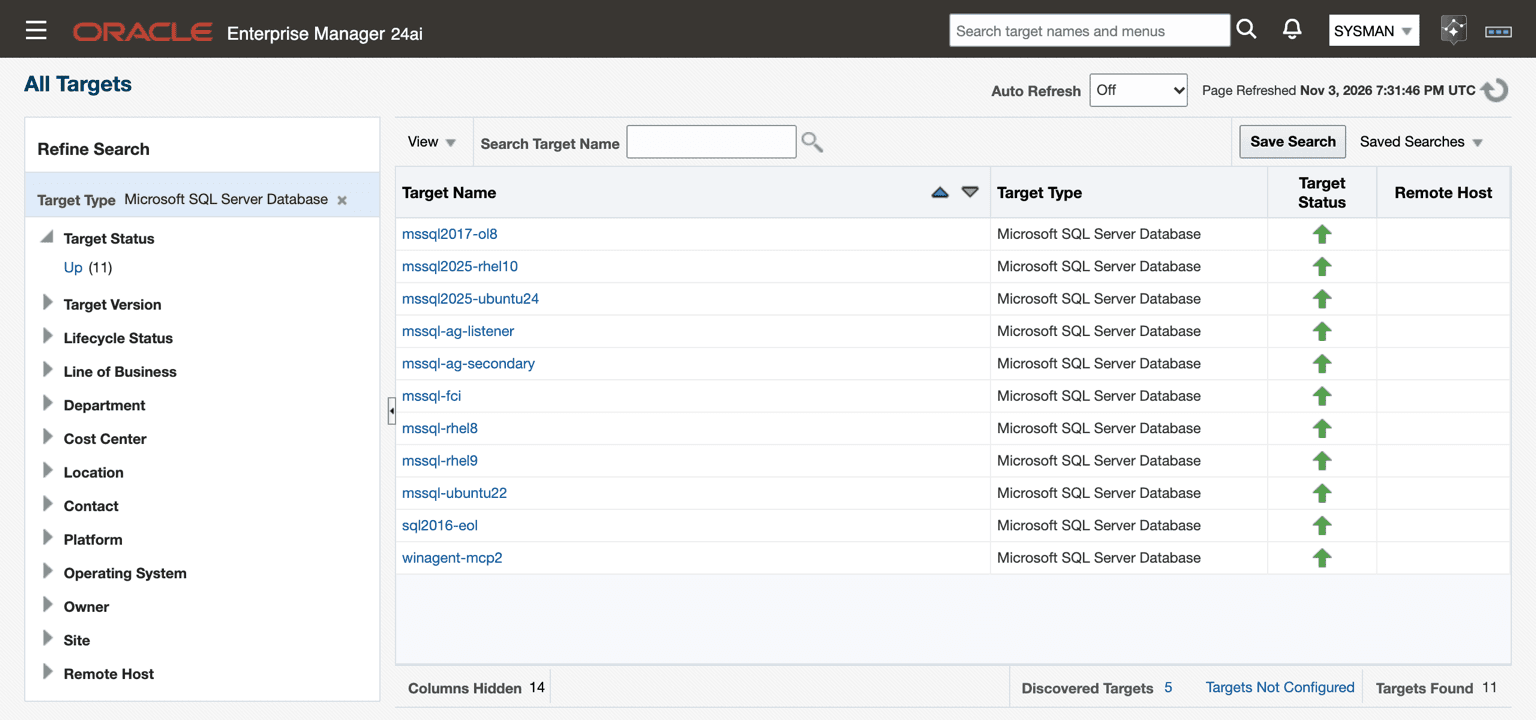
To see it against your own servers, request a trial, install the plug-in beside the one you run today, and add one MySQL Database target. The October 23 announcement covers the SQL Server and Db2 plug-ins that reached general availability the same day.