If you run SQL Server, July 14, 2026 is a date worth circling. It's when SQL Server 2016 leaves extended support: after that, security fixes only arrive through a paid Extended Security Updates subscription, they're limited to issues rated Critical, and they run for at most three more years. And if any of that estate sits on AWS RDS, the timeline comes with hard bookends. AWS stopped letting you create new RDS SQL Server 2016 instances back on January 15, 2026, and on September 8, 2026 it begins force-upgrading whatever's still on 2016 to 2019, regardless of your maintenance window. One way or another, part of your fleet is changing version this year.
Here's the part that makes it more than a patch ticket. The end-of-support date arrives just as Microsoft's first-party SQL tooling has consolidated toward paid, Azure-hosted options, and the on-prem health capability that's left only runs on Windows. So you're being pushed to migrate versions at the same moment your visibility options narrow. The Microsoft SQL Server Plug-in for Oracle Enterprise Manager, entering Early Access on July 31, 2026, is built for this moment: it flags the instances still on the dead version for you, and it monitors the versions you're moving to, 2017 through 2025, on Windows and Linux, from the Oracle EM console you already run.
This post has three parts: the date and what it forces, why your SQL monitoring options have narrowed, and what "ready for the migration" looks like in the console.
The date, and what it forces
SQL Server 2016 leaves extended support on July 14, 2026. After that, security fixes come only through paid Extended Security Updates, only for issues Microsoft rates Critical, and only for up to three years. On AWS RDS the clock is even more concrete: new RDS SQL Server 2016 instances have been blocked since January 15, 2026, and on September 8, 2026 AWS force-upgrades any that remain to 2019, regardless of the maintenance window, so even the "we'll deal with it later" instances have a date attached.
So you're migrating, whether or not you planned to be. The destinations are well defined: 2017 (in support to 2027), 2019 (to 2030), 2022 (to 2033), and 2025, the new primary target. 2014 is already out of support entirely.
The hard part of a version migration isn't the upgrade itself. It's everything after it: which instances actually moved, which are stranded on the deprecated build, and whether your monitoring followed them to the new version and the new platform. That's a visibility problem, and visibility is exactly what a console is supposed to give you.
Your SQL monitoring options have narrowed

Over the last two years, Microsoft's first-party SQL tooling has consolidated toward paid and Azure-hosted options. Azure Data Studio reached end of support in February 2026. SQL Insights, the Azure Monitor preview that was meant to be the modern story, was retired at the end of 2024. And the on-premises health capability that remains, the Arc-enabled best-practices assessment, is available only with a paid license, and by Microsoft's own documentation it "is currently limited to SQL Server running on Windows machines" and "doesn't currently apply to SQL Server on Linux."
Read the direction, not just the individual changes. The first-party options are narrowing toward Azure and a paid tier, and the assessment that's left stops at the Windows boundary. That's an awkward place to stand in the same month a version cliff is pushing databases around your estate, some of them onto Linux.
What "ready for the migration" looks like in the console
Being ready for July 14 isn't complicated. It's three things, and they live in one place.
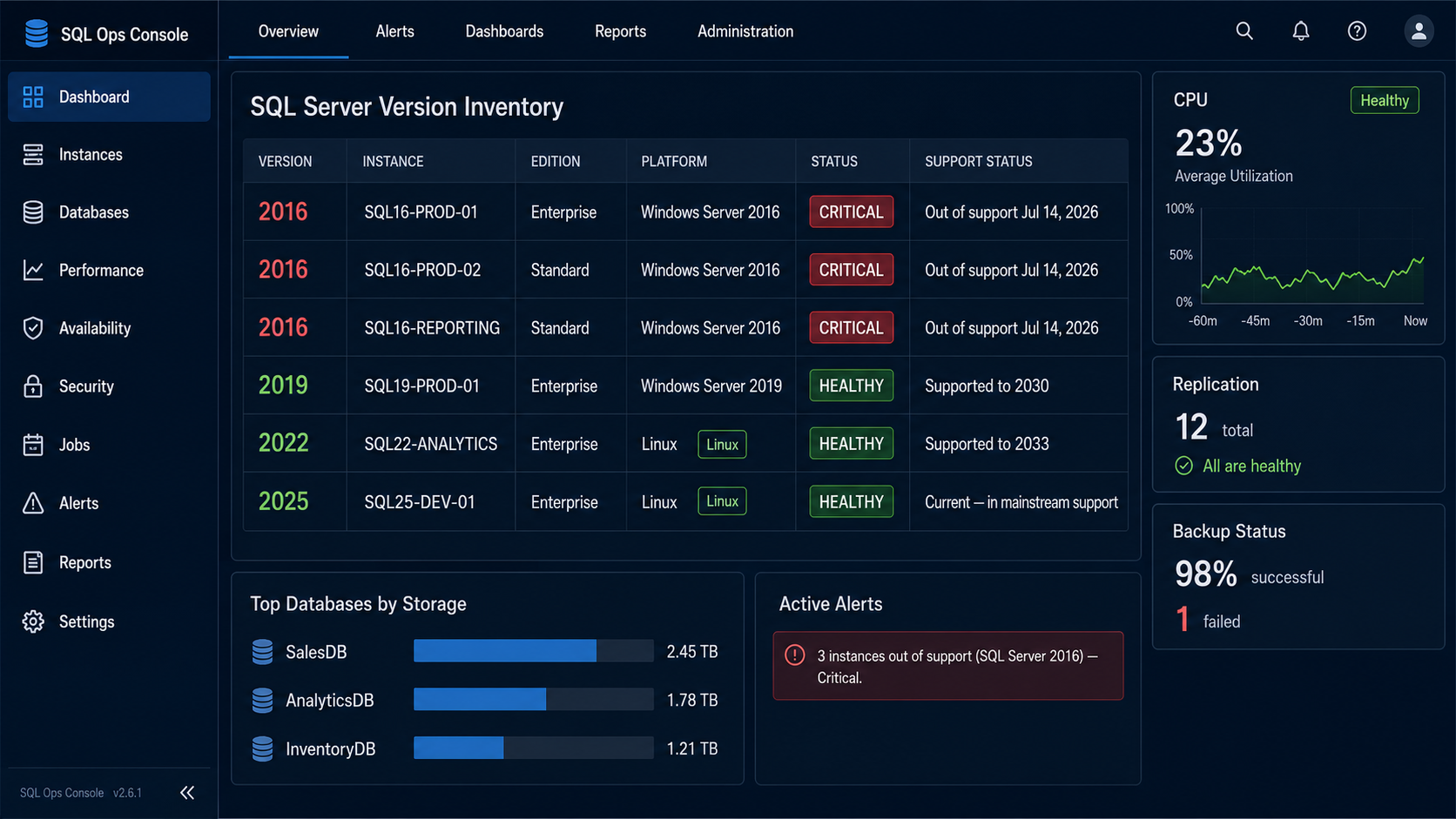
- Know what's stranded. A version-EOL advisory rule flags every instance still on 2016 or older, so "what's left on the dead version?" is a screen you can hand to an auditor instead of a spreadsheet you maintain by hand.
- Be certified for where you're going. 2017, 2019, 2022, and 2025 are all supported targets, monitored the same way in the Oracle EM console, so the instances you upgrade don't drop out of coverage on the way.
- Follow your databases to Linux. SQL Server 2025 is first-class on Linux, with Red Hat Enterprise Linux 10 and Ubuntu 24.04 supported, and the plug-in's collection runs from a Linux agent. Microsoft's own best-practices assessment is Windows-only, so when your migration moves workloads onto Linux, this is monitoring that travels with them rather than stopping at the OS boundary.
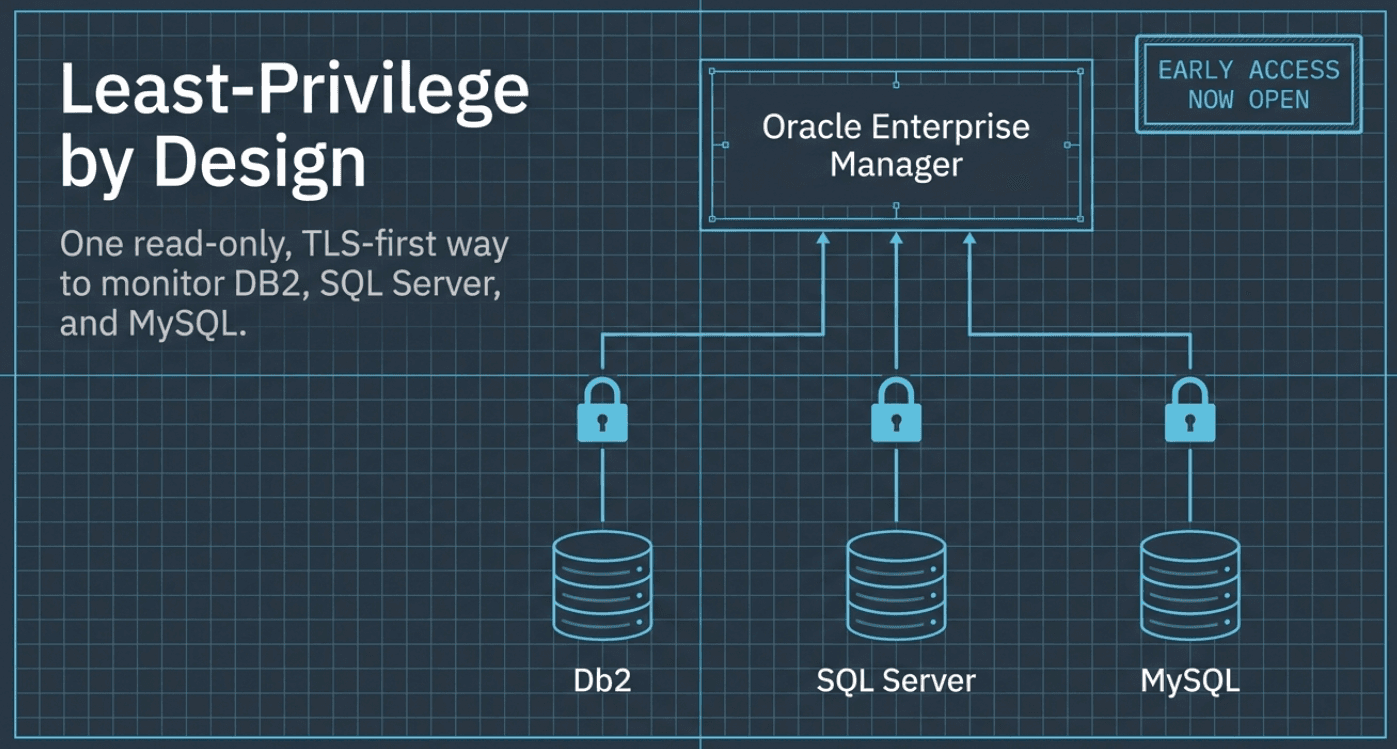
All of it runs from a single read-only VIEW SERVER STATE login, TLS-first, with no xp_cmdshell and your choice of a local or remote agent.
July 14 is a forcing function. Your versions are changing whether you scheduled it or not, and the first-party tooling you'd reach for has moved toward Azure and a paid, Windows-only tier. The response isn't dramatic: make sure your monitoring knows your version matrix, flags what's stranded on the way out, and follows your databases to the version and the platform they're landing on.
For the team running the cutover, the win is boring and real. A screen that says "these three are still on 2016," and monitoring that's already watching the 2022 and 2025 instances you just stood up, so you're not rebuilding dashboards from scratch during a coverage gap.
This is the third post in a series on the blind spots your estate monitoring leaves across MySQL, SQL Server, and DB2. The earlier two were about what you can't see day to day: The Backup You Can't See, on whether last night's backup actually succeeded, and The DR-Readiness Gap, on whether a "synchronized" cluster could really fail over without losing data. This one is about a date on the calendar, but the shape is the same: the facts you need are already knowable; the job is to put them on a screen before they become an incident.
Get Early Access
The version matrix, the EOL advisory rule, and Linux support arrive with the Microsoft SQL Server Plug-in for Oracle Enterprise Manager, and Early Access opens July 31, 2026. Want it ready before your migration is? Learn more and sign up:
We bring the same version-matrix and least-privilege approach to the MySQL and DB2 plug-ins, too.
What exactly happens to SQL Server 2016 on July 14, 2026?+
It leaves extended support, the final phase of Microsoft's lifecycle. Free security patching stops. After that, you can only get security fixes by buying an Extended Security Updates (ESU) subscription, and even then only for issues Microsoft rates Critical, for at most three more years. SQL Server 2014 is already out of support entirely.
My SQL Server 2016 runs on AWS RDS — do I have to do anything?+
The timeline is decided for you. AWS stopped allowing new RDS SQL Server 2016 instances on January 15, 2026, and on September 8, 2026 it begins upgrading any that remain to 2019, regardless of your maintenance window. So even instances nobody has scheduled will change version. The practical task is making sure your monitoring follows them to 2019 rather than losing sight of them mid-upgrade.
Which SQL Server versions does the plug-in monitor?+
The supported-target set: 2017, 2019, 2022, and 2025, monitored the same way in the Oracle Enterprise Manager console. It also flags out-of-support versions (2016 or older) through a version-EOL advisory rule, so upgraded instances stay covered and stranded ones stay visible.
Does it work on SQL Server on Linux?+
Yes. SQL Server 2025 is first-class on Linux (Red Hat Enterprise Linux 10 and Ubuntu 24.04 among the supported platforms), and the plug-in's collection runs from a Linux agent. This is the specific gap it closes here: Microsoft's own Arc-enabled best-practices assessment is Windows-only, so if your migration moves workloads onto Linux, the plug-in keeps watching them instead of stopping at the OS boundary.
What happened to Microsoft's own SQL monitoring tools?+
They've consolidated toward paid and Azure-hosted options. SQL Insights (the Azure Monitor preview meant to be the modern story) was retired at the end of 2024, and Azure Data Studio reached end of support in February 2026. The on-premises capability that remains, the Arc-enabled best-practices assessment, needs a paid license and, by Microsoft's documentation, runs only on SQL Server on Windows.
What access does the plug-in need on each instance?+
One read-only login with the VIEW SERVER STATE permission. Collection is TLS-first, uses no xp_cmdshell, and needs no operating-system access, so it doesn't shell out to the host. You can point it at each instance through a local or a remote agent, whichever fits your topology.