In a previous blog post, we introduced Logging Analytics and walked through setting up your first logging source. Now, it's time to dive into the OCI Logging Analytics Query Language — a powerful query language that enables you to filter, aggregate, and transform log data to uncover meaningful insights.
Understanding Query Language Components
The query language comprises several key elements:
- Search Strings — Used to find specific keywords in logs. You can leverage REGEX or Boolean operators for precise filtering.
- Commands — Perform operations on log records, such as creating new fields, calculating values, or generating statistics. For example, the
statscommand aggregates results. Commands are highlighted blue in the query editor. - Functions — Transform data, such as counting unique occurrences of a field using
distinctcount. Functions are highlighted green. - Operators — Logical operators like
and,or, andnot inhelp refine queries further. These appear in purple. - Arguments — Specific parameters that modify functions.
- Function Clauses — Allow renaming fields or making values more readable. These are highlighted orange.
Query Example: Aggregating Log Records
Consider the following query:
* | stats count as logrecords by 'Log Source' | sort -logrecordsBreaking It Down:
*— This wildcard pulls all log records (our search string).|— The pipe operator chains commands together.stats count as logrecords by 'Log Source'—statsaggregates the results.countcalculates the total number of log records per Log Source.as logrecordsrenames the count field to logrecords for better readability.
| sort -logrecords— Sorts the results in descending order.
Query Execution and Visualization
When you run this query in OCI Logging Analytics, you'll see a structured table of log sources ranked by the number of log records.
Beyond just text-based queries, OCI provides an intuitive UI that simplifies analysis:
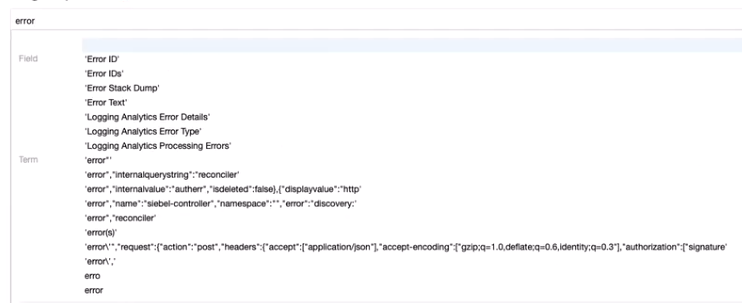
- Auto-complete suggestions — When typing "error," OCI suggests relevant fields and terms, speeding up query writing.
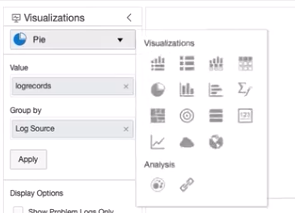
- Visualization options — Easily switch between tables, pie charts, histograms, and other formats to better interpret your data.
Unlocking the Full Potential of Logging Analytics
OCI Logging Analytics Query Language is a powerful tool for filtering, transforming, and visualizing your log data. Whether you're troubleshooting issues or monitoring system performance, mastering queries will help you extract meaningful insights efficiently.
We've only scratched the surface — stay tuned for our next posts, where we'll explore more advanced use cases and best practices for OCI Logging Analytics.